
Overview
Advance Category Page is a Magento 2 extension from Magexweb that gives store owners full control over how product categories are shown on the storefront. It adds a configurable, SEO-friendly "All Categories" landing page, a subcategory showcase on the native category page, and three ready-to-use widgets (Grid, List and Slider) that can be placed on any CMS page, block or layout through Magento's standard widget system.
It is aimed at merchants with medium to large category trees (fashion, home goods, multi-brand marketplaces, B2B catalogs) who want visual, image-led category navigation without a developer for every layout change.
Key features
- "All Categories" landing page with your own URL, title, meta title and description, and rich-text top and bottom descriptions
- Three display layouts, Grid, List and Slider (carousel), chosen separately for the categories page, the subcategory section and each widget
- Subcategory showcase added to Magento's category page (grid, list or slider), configurable per store view
- A Thumbnail Image field on the category edit form, separate from Magento's Category Image, with its own uploader
- Three CMS widgets (Grid, List, Slider) that editors place on any CMS page or block with the "Insert Widget" button
- Per-widget controls: parent category, sort order (name, ID or position), excluded categories, category limit, columns, product count badge, child categories, summary with a character limit, and hiding empty categories
- Slider built on Owl Carousel, with loop, arrows, dots, autoplay, autoplay speed and four responsive breakpoints (0, 567, 767 and 1023 px)
- A global enable switch, and every setting can be set per store view
- The categories page has its own route, so it works like any native URL and uses the URL key you set
How it works
The module (Magexweb_Advancecategory) is a standard Magento 2 component. It adds:
- A router that matches the configured URL and renders the categories landing page
- A content block on the native
catalog_category_viewlayout that shows the subcategory grid, list or slider under the category description - Three widgets (Grid layout, List layout, Slider layout) registered for use anywhere Magento widgets are supported
- The Thumbnail Image field on the admin category form, with its own upload handling and image validation
- A configuration section (Stores > Configuration > Magexweb Settings > Advance Category Configuration) with General, Category List, Category Page and Category Widget groups
Requirements and compatibility
| Item | Detail |
|---|---|
| Platform | Magento Open Source / Adobe Commerce 2.x |
| PHP | The PHP versions supported by your Magento version (check the module's composer.json before deploying to production) |
| Dependencies | Magento_Catalog, Magento_Widget, Magento_Cms, Magento_Config, Magento_Backend |
| Frontend libraries | Owl Carousel (bundled) for the Slider layout |
| License | GPL-3.0-or-later |
| Module code | Magexweb_Advancecategory |
Installation
Composer installation (recommended)
- Place the extension in your project (via a private Composer repository, Packagist, or by copying it under
app/code). - From the Magento root, run the following commands:
| Command | Purpose |
|---|---|
composer require magexweb/advancecategory | Only if distributed via a Composer repository |
php bin/magento module:enable Magexweb_Advancecategory | Registers and enables the module |
php bin/magento setup:upgrade | Runs the module's data patch (adds the Thumbnail Image attribute) and schema updates |
php bin/magento setup:di:compile | Recommended for production mode |
php bin/magento setup:static-content:deploy -f | Required in production mode |
php bin/magento cache:flush | Clears the Magento cache |
Manual (ZIP) installation
- Copy the Advancecategory folder to
app/code/Magexweb/Advancecategoryin your Magento installation. - Run the same
bin/magentocommands listed above (module:enable, setup:upgrade, di:compile, static-content:deploy, cache:flush). - Check the module is active:
php bin/magento module:status Magexweb_Advancecategory
After installation
- Go to Stores > Configuration > Magexweb Settings > Advance Category Configuration and check the section is there.
- Set Module Enable to Yes under General Configuration.
- Set the URL key and title of the categories landing page.
- Open any category in Catalog > Categories and check the new Thumbnail Image field appears in the Content section.
- Visit the categories page URL on the storefront to check it loads.
Admin configuration
All settings are under Stores > Settings > Configuration > Magexweb Settings > Advance Category Configuration.
General configuration

| Field | Description |
|---|---|
| Module Enable | Master switch for the whole extension, including the categories page, the subcategory block and the widgets. |
Category list settings
These control the "All Categories" landing page.
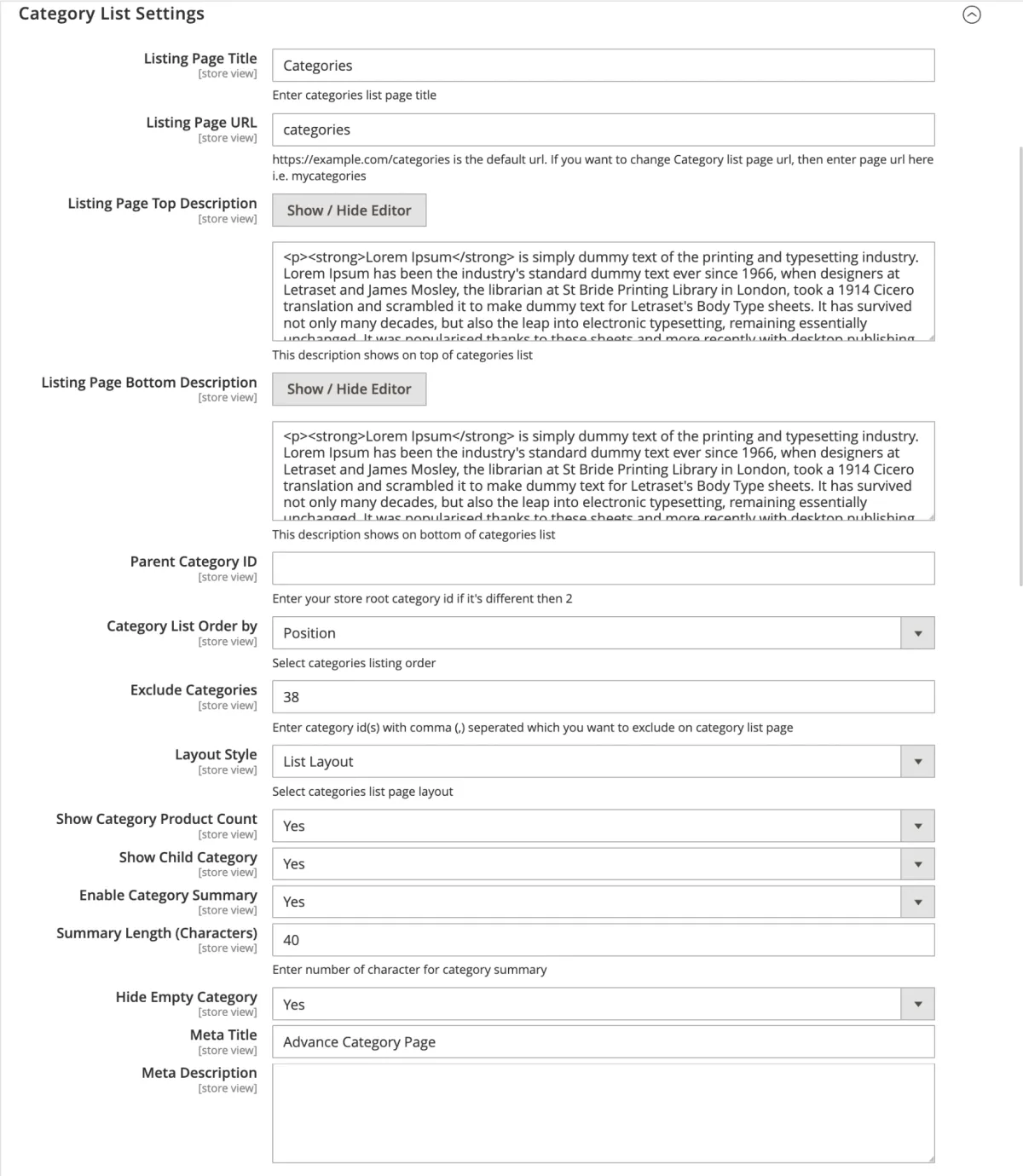
| Field | Description |
|---|---|
| Listing Page Title | Title shown on the categories landing page |
| Listing Page URL | URL key of the landing page (default: categories) |
| Listing Page Top Description | Editor content shown above the category list |
| Listing Page Bottom Description | Editor content shown below the category list |
| Parent Category ID | The category whose children are listed (defaults to the store root, usually ID 2) |
| Category List Order by | Name, ID or Position |
| Exclude Categories | Comma-separated category IDs to leave out |
| Layout Style | Grid, List or Slider |
| No. of Columns | Grid columns per row (only when Layout Style is Grid) |
| Show Category Product Count | Shows the product count badge for each category |
| Show Child Category | Shows nested child categories in the list |
| Enable Category Summary | Shows a short description for each category |
| Summary Length (Characters) | Character limit for the summary |
| Hide Empty Category | Hides categories with no products |
| Meta Title / Meta Description | Search engine title and description of the landing page |
Category page settings
These control the subcategory showcase on Magento's category page (for example above or below the product list of a parent category).
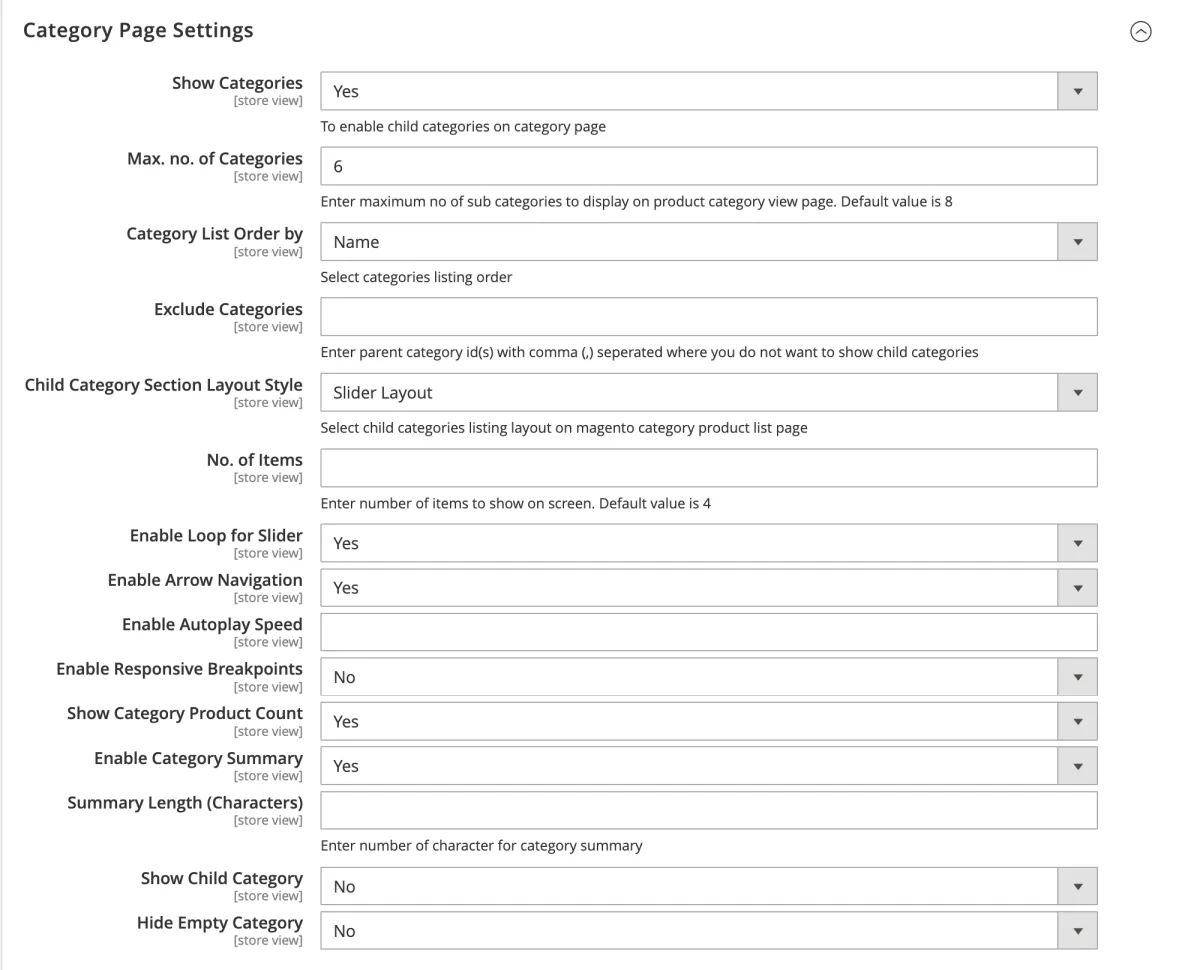
| Field | Description |
|---|---|
| Show Categories | Turns the subcategory block on the category page on or off |
| Max. no. of Categories | Maximum subcategories to show (default 8) |
| Category List Order by | Name, ID or Position |
| Exclude Categories | Parent category IDs on which the subcategory block should not show |
| Child Category Section Layout Style | Grid, List or Slider |
| No. of Columns | Grid columns per row (Grid layout only) |
| No. of Items, Loop, Nav, Dots, Autoplay, Autoplay Speed | Slider controls (Slider layout only) |
| Enable Responsive, and items per breakpoint (1023, 767, 567, 0 px) | How many slider items show at each screen width |
| Show Category Product Count | Shows the product count badge for each subcategory |
| Enable Category Summary, Summary Length | Short description and its character limit |
| Show Child Category | Shows nested grandchild categories |
| Hide Empty Category | Hides subcategories with no products |
Category widget settings
This group shows ready-made widget codes for the three layouts, to paste into a CMS page or static block (see Storefront widgets). It does not store any settings itself.
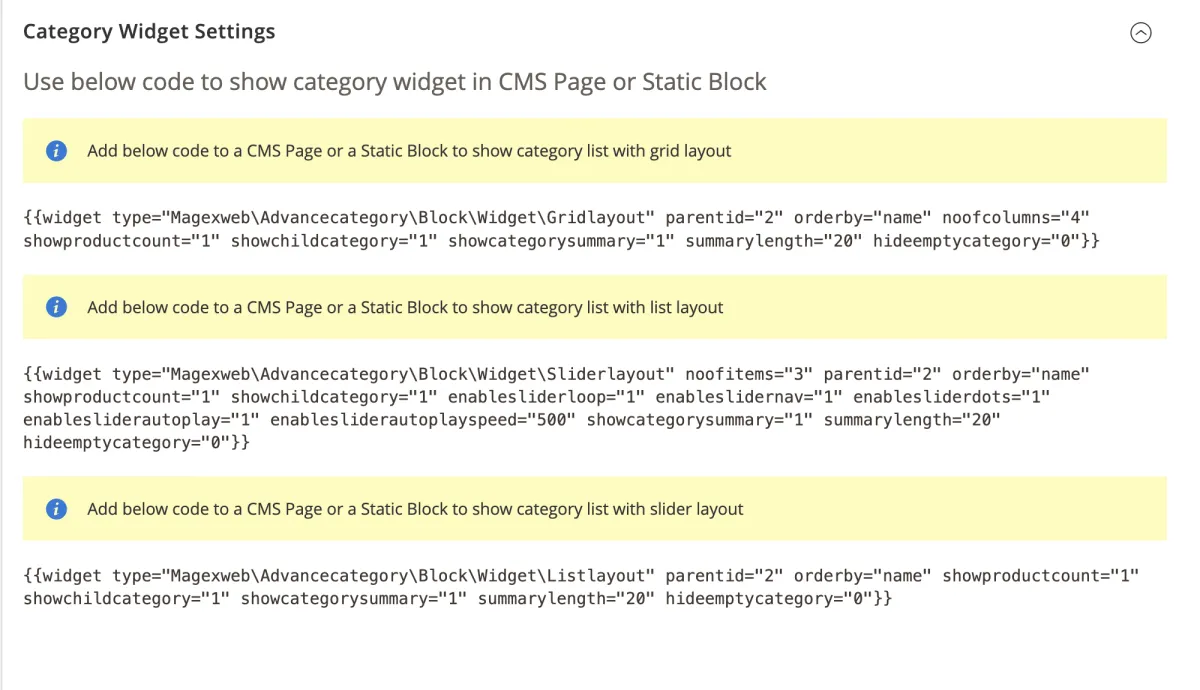
Category thumbnail image
The module adds a Thumbnail Image field under Catalog > Categories > [Category] > Content, next to Magento's Category Image. Use it for a differently cropped or optimised image for the grid, list and slider, without changing the main category banner used elsewhere in your theme.
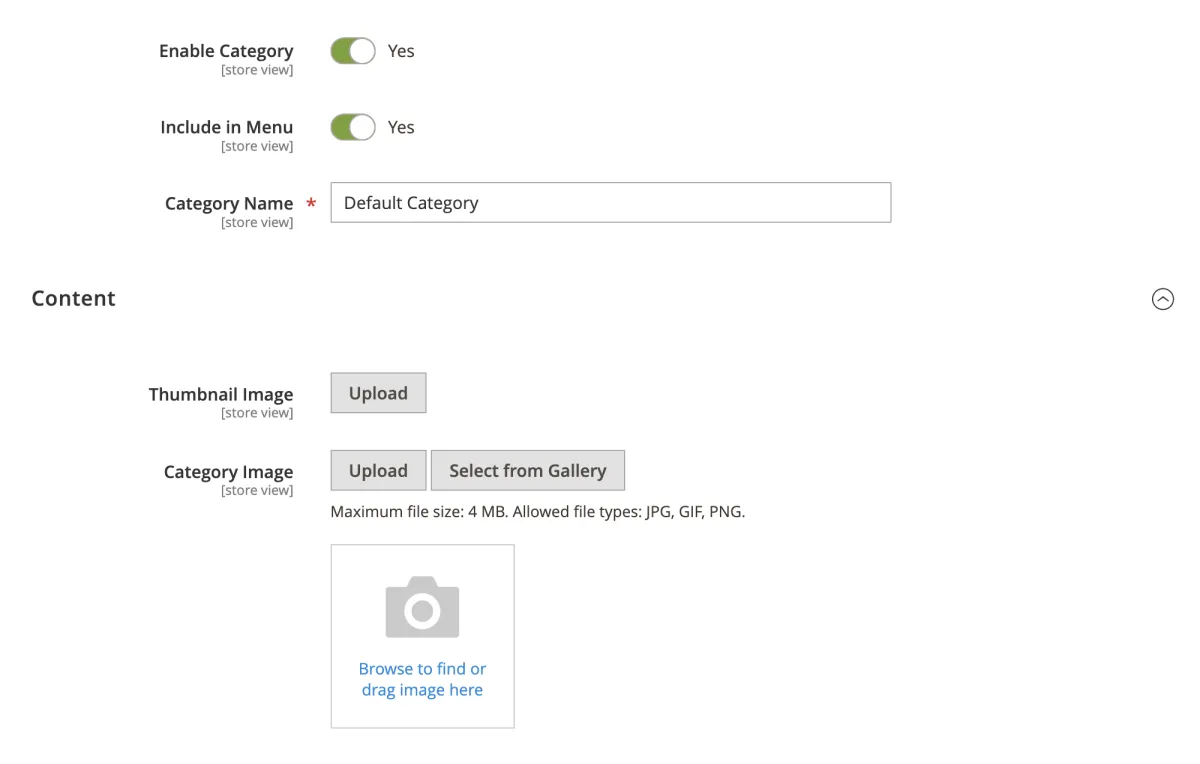
Storefront widgets
Three widgets are available from the Insert Widget button of any editor (CMS pages, CMS blocks, static blocks used in layout XML). A widget's options override the matching default settings for that placement.
Advance Category Grid Layout
Shows categories as a responsive image grid.
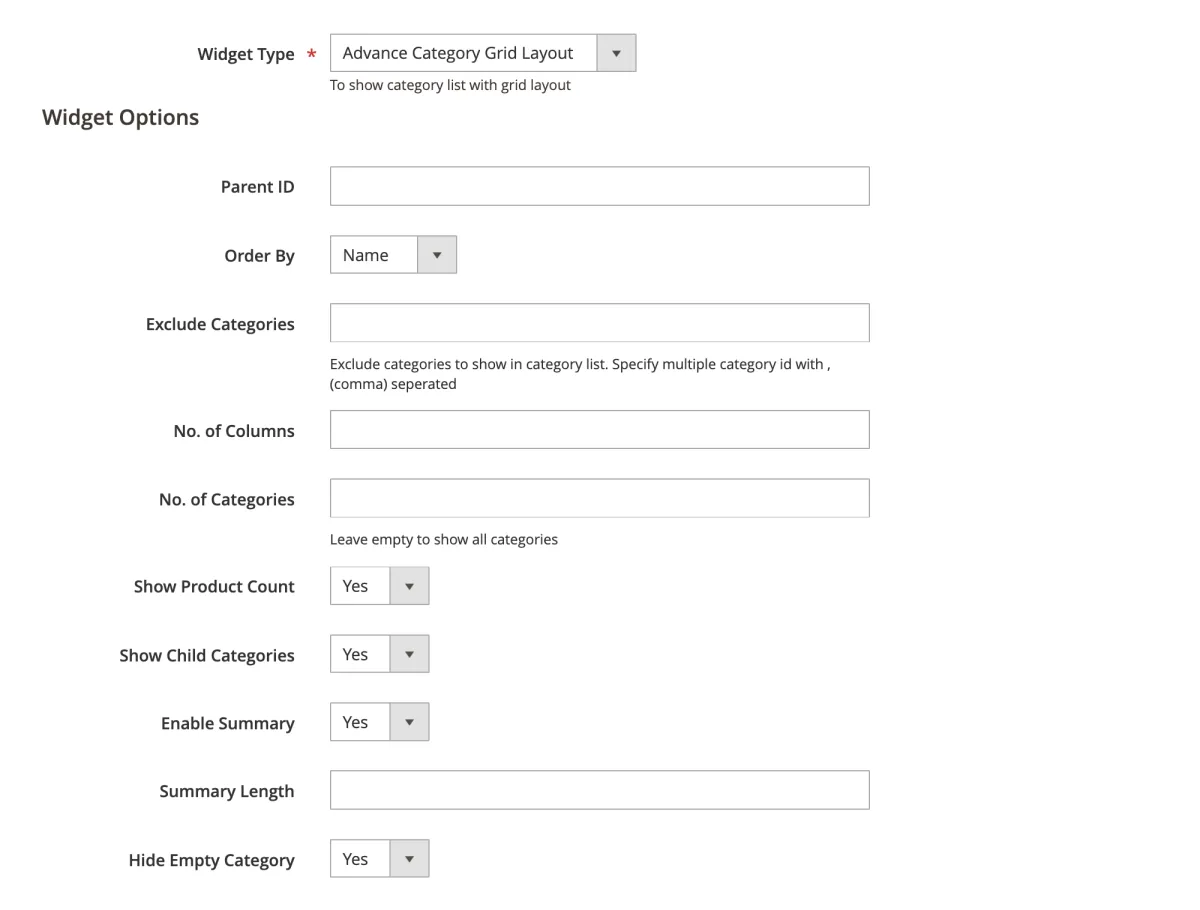
| Option | Description |
|---|---|
| Parent ID | The category whose children are listed |
| Order By | Name, ID or Position |
| Exclude Categories | Comma-separated category IDs to skip |
| No. of Columns | Columns per row |
| No. of Categories | Maximum categories shown (empty: all) |
| Show Product Count | Yes or No |
| Show Child Categories | Yes or No |
| Enable Summary | Yes or No |
| Summary Length | Character limit |
| Hide Empty Category | Yes or No |
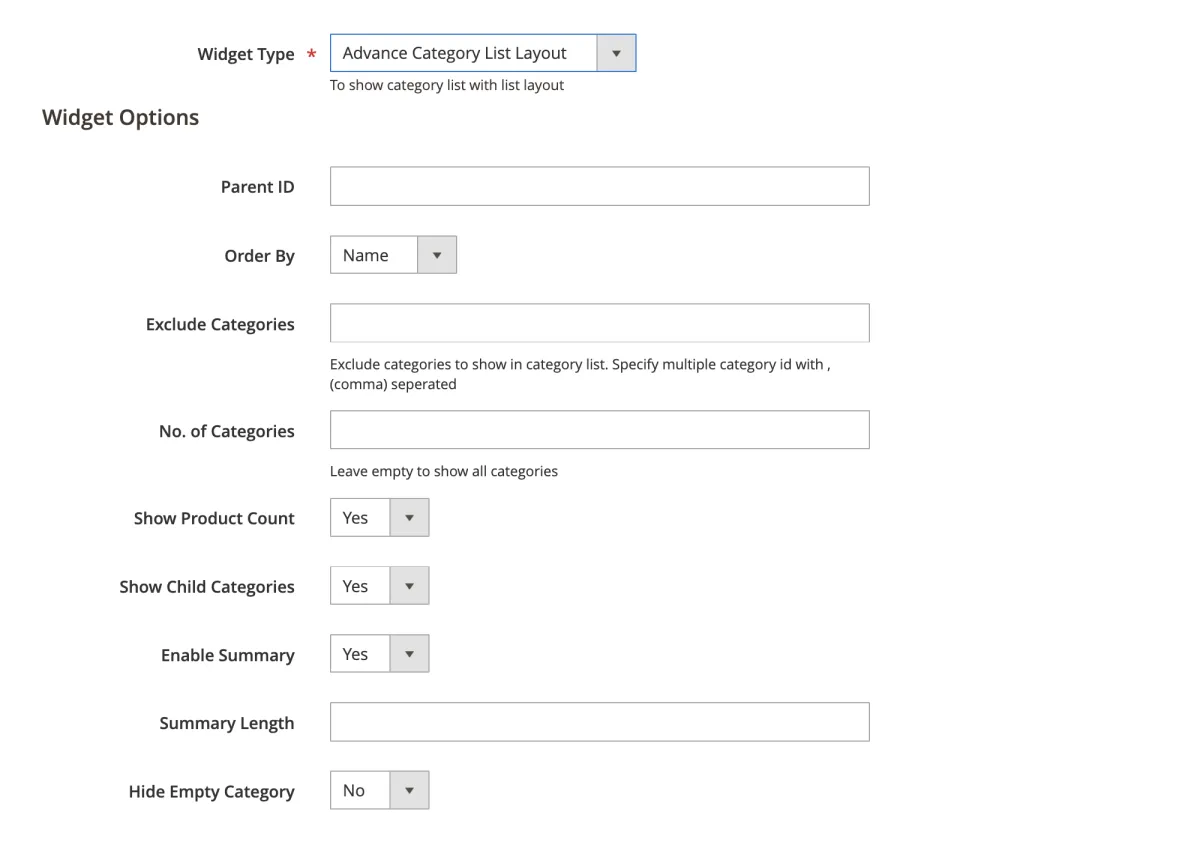
Advance Category List Layout
Shows categories as a vertical list with image, title, product count and an optional summary. Its options are the same as the Grid layout's, without No. of Columns.
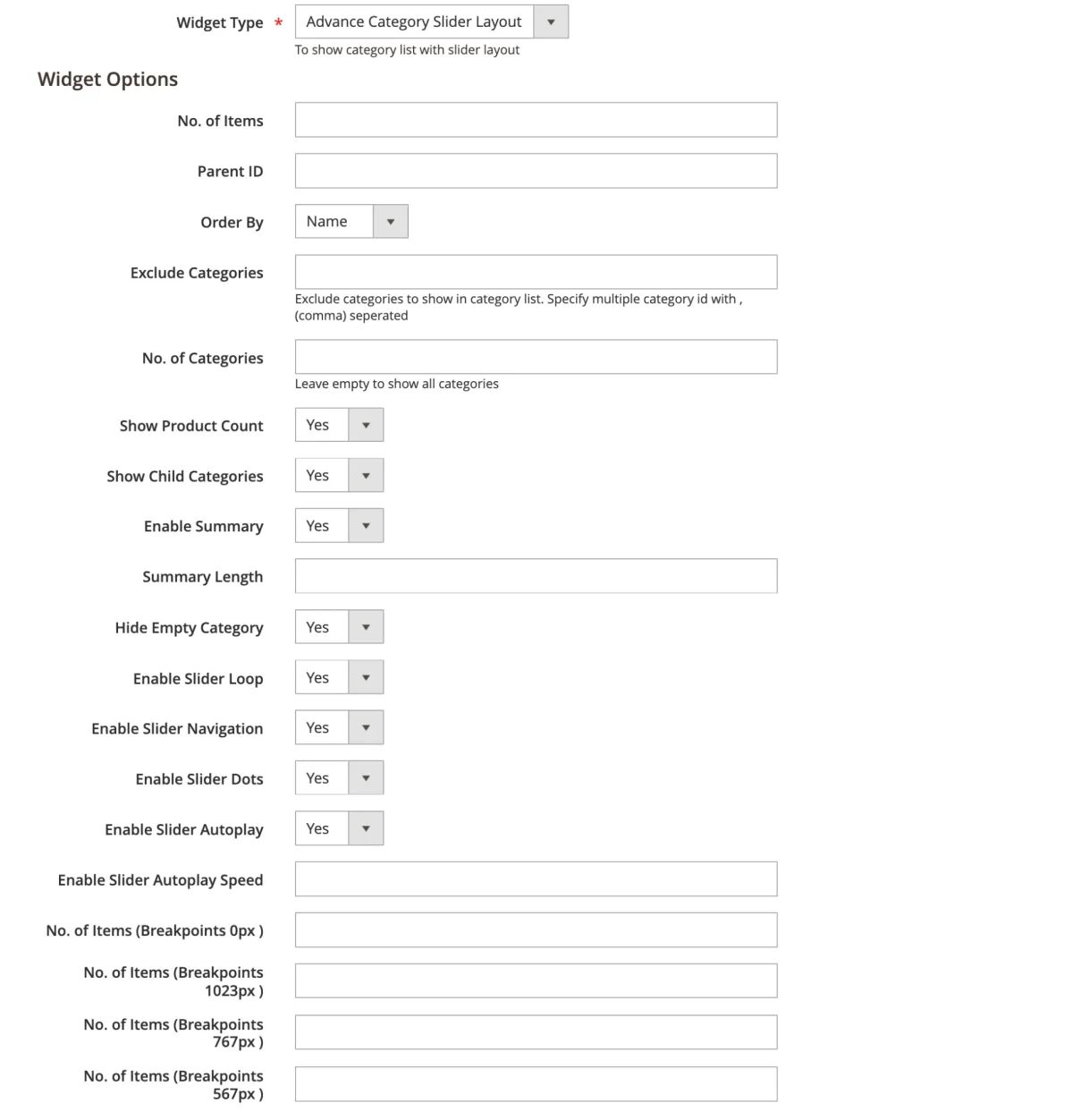
Advance Category Slider Layout
Shows categories as an Owl Carousel slider with responsive and autoplay controls.
| Option | Description |
|---|---|
| No. of Items | Default items visible per slide |
| Parent ID | The category whose children are listed |
| Order By | Name, ID or Position |
| Exclude Categories | Comma-separated category IDs to skip |
| No. of Categories | Maximum categories shown (empty: all) |
| Show Product Count, Show Child Categories, Enable Summary, Summary Length, Hide Empty Category | As in the Grid and List widgets |
| Enable Slider Loop, Navigation, Dots, Autoplay, Autoplay Speed | Carousel behaviour |
| No. of Items at 0, 567, 767 and 1023 px | Items shown at each screen width |
Uninstallation
php bin/magento module:disable Magexweb_Advancecategory- Remove the module files (
composer remove magexweb/advancecategory, or deleteapp/code/Magexweb/Advancecategory). php bin/magento setup:upgrade && php bin/magento cache:flush
Note: uninstalling does not remove the category_thumbnail_image attribute or the thumbnail images already uploaded. Check Catalog > Attributes and your media storage if you want a full cleanup.
Troubleshooting and FAQ
The categories landing page returns a 404
- Check Module Enable is Yes under General Configuration.
- Check the Listing Page URL doesn't clash with an existing CMS page or catalog URL rewrite.
- Flush the cache and check again.
The slider does not show, or arrows and dots are missing
- Check
requirejs-config.jsis deployed (runsetup:static-content:deployagain after any theme change). - Check the browser console for a JavaScript conflict with another Owl Carousel version bundled by a different extension or theme.
The Thumbnail Image field is missing on the category edit page
- Run
setup:upgradeagain so the data patch that adds the attribute runs. - In production mode, clear
generated/andvar/cache/, runsetup:di:compile, and check again.
Support
For help, email info@magexweb.com.