
Overview
The Magexweb Reindex from Admin extension gives store administrators a one-click way to reindex Magento's data indexes from the Admin Panel, without SSH or command-line access and without waiting for the next scheduled cron run.
It works inside Magento's existing System → Index Management grid: it adds a Reindex action to each indexer row, and a Reindex option to the grid's mass-action dropdown so several indexers can be rebuilt at once.
Key features
- One-click "Reindex" action on every row of the Index Management grid
- Mass-action support: select several indexers and reindex them all in one click
- Reindex runs immediately (in the foreground) when triggered, with no wait for cron
- Clear success and error messages after each reindex, including a count of how many succeeded or failed in a mass action
- Confirmation prompt before reindexing, to prevent accidental clicks
- Its own admin permission (ACL), so you control which admin roles may trigger a reindex
- Failures are logged to the Magento system/exception log and do not stop the remaining indexers in a mass action
- No configuration required: it works as soon as it is installed
How it works
Reindex from Admin extends Magento's native Index Management grid (Admin → System → Index Management) rather than adding a new page. When you trigger a reindex, the extension:
- Looks up the selected indexer(s) using Magento's own indexer registry.
- Runs a full reindex (
reindexAll) for each selected indexer, one at a time, immediately in the current request. The page waits until the reindex finishes before returning to the grid. - Reports back with a success message (e.g. "Catalog Product Price was reindexed successfully.") or an error message if something went wrong.
For a mass action, it carries on with the remaining indexers even if one fails, then shows a combined summary, e.g. "Successfully reindexed 4 indexer(s)" and/or "Unable to reindex 1 selected indexer(s). Check the system log for details."
Requirements and compatibility
| Item | Detail |
|---|---|
| Platform | Magento Open Source / Adobe Commerce 2.x |
| PHP | The PHP versions supported by your Magento version (check the module's composer.json before deploying to production) |
| License | GPL-3.0-or-later |
| Module code | Magexweb_Reindexmanager |
Installation
Composer installation (recommended)
- Place the extension in your project (via a private Composer repository, Packagist, or by copying it under
app/code). - From the Magento root, run the following commands:
| Command | Purpose |
|---|---|
composer require magexweb/reindexmanager | Only if distributed via a Composer repository |
php bin/magento module:enable Magexweb_Reindexmanager | Registers and enables the module |
php bin/magento setup:upgrade | Runs the module's setup |
php bin/magento setup:di:compile | Recommended for production mode |
php bin/magento setup:static-content:deploy -f | Required in production mode |
php bin/magento cache:flush | Clears the Magento cache |
Manual (ZIP) installation
- Copy the extension folder to
app/code/Magexweb/Reindexmanagerin your Magento installation. - Run the same
bin/magentocommands listed above (module:enable, setup:upgrade, di:compile, static-content:deploy, cache:flush). - Check the module is active:
php bin/magento module:status Magexweb_Reindexmanager
Setting admin permissions
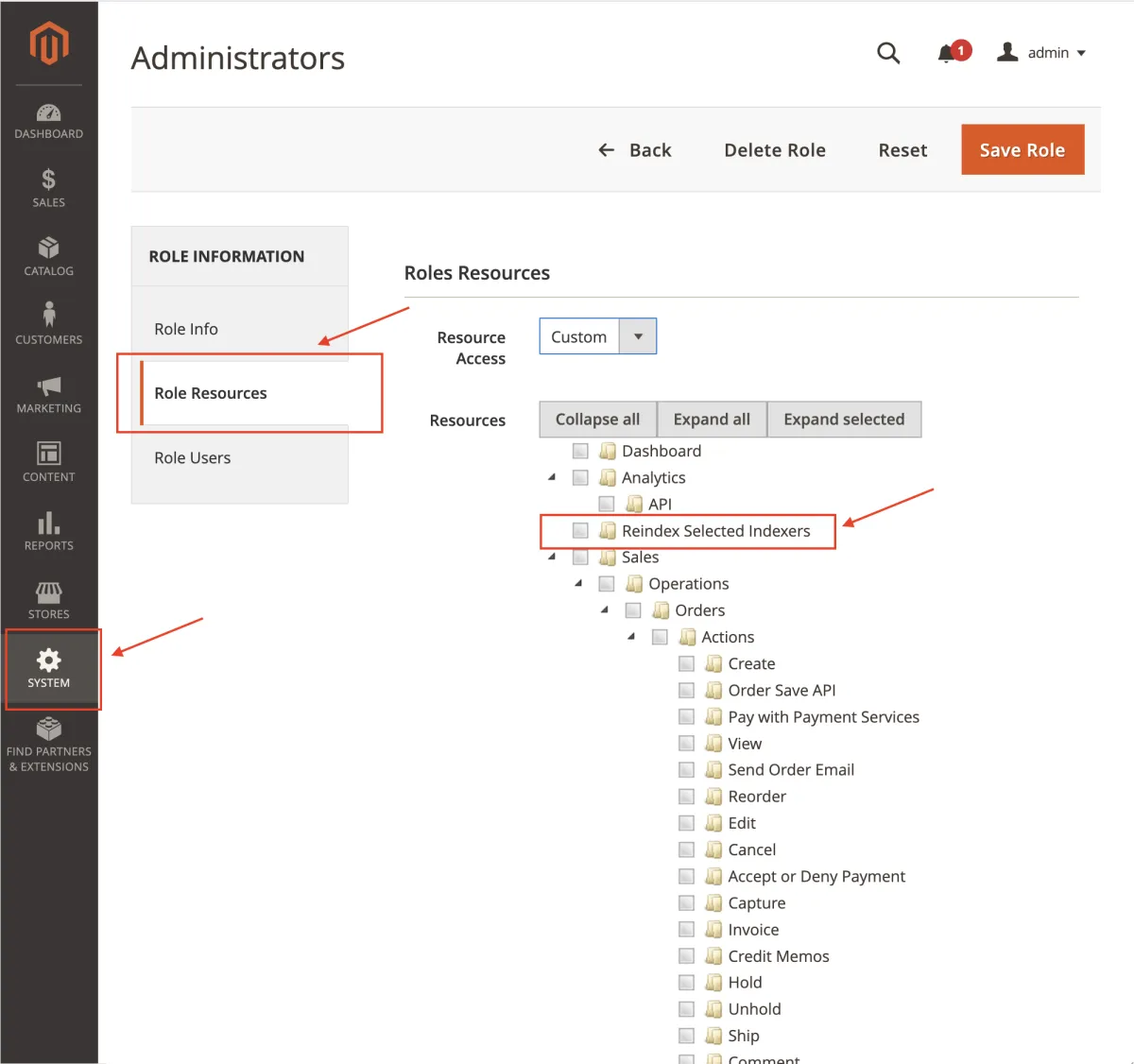
Reindex from Admin registers its own Access Control List (ACL) resource named Reindex Selected Indexers. This lets you decide which admin roles may trigger a reindex from the grid, separately from other admin permissions.
- Go to System → Permissions → User Roles and open (or add) a role.
- Click Role Resources.
- In the permissions tree, find Reindex Selected Indexers and tick it to grant access. It sits near the top level of the tree, directly under the main Admin resource, not under Index Management.
- Click Save Role.
Using Reindex from Admin
Open Admin → System → Index Management. You will see the standard Magento indexer grid, with an extra Action column added by this extension.
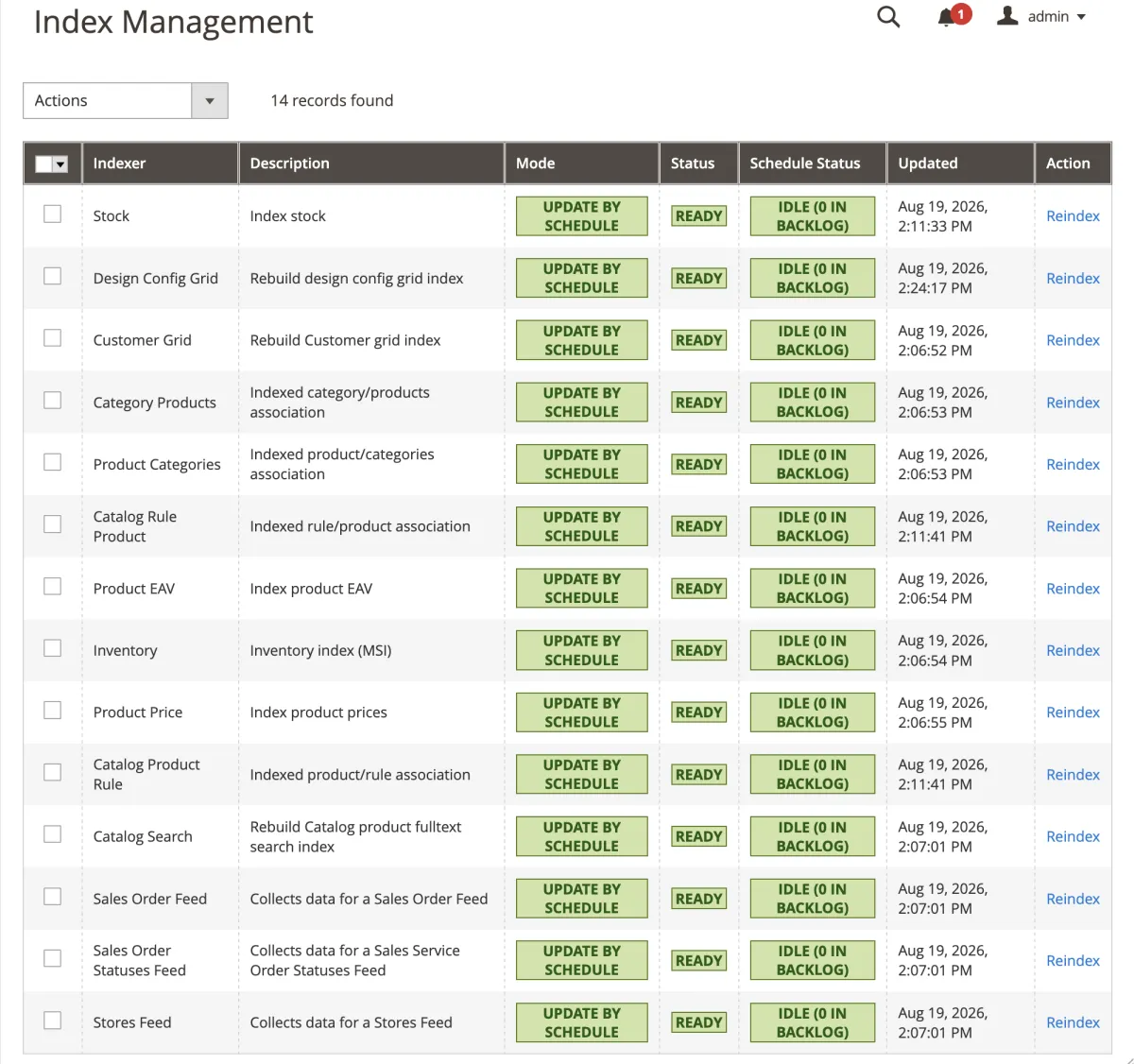
Reindexing a single indexer
- Find the row for the indexer you want to rebuild (e.g. Catalog Product Price, Catalog Category Product).
- Click the Reindex link in the Action column for that row.
- Confirm the action in the prompt that appears.
- Wait for the page to reload. A success or error message appears at the top of the grid.
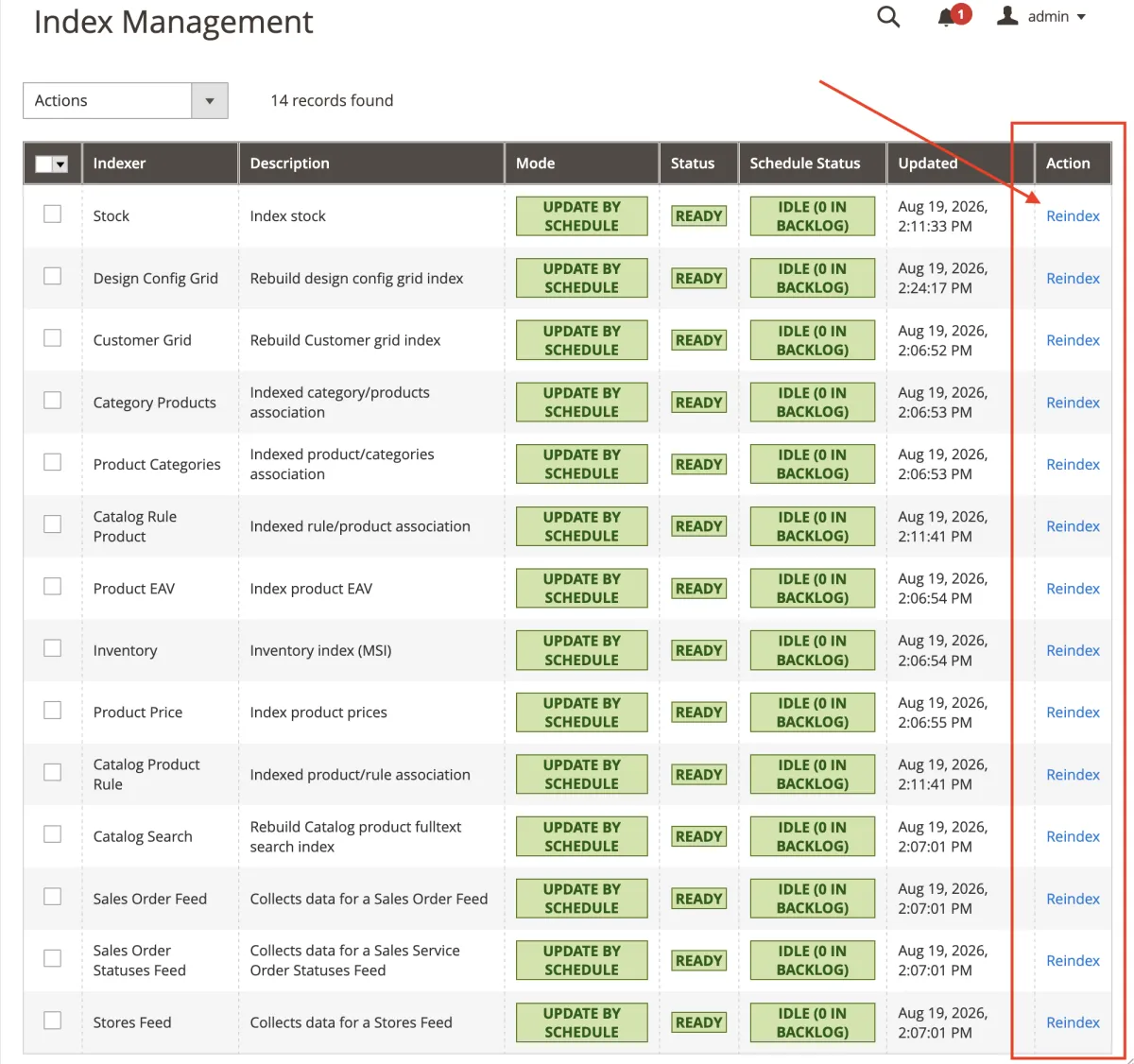
Reindexing several indexers (mass action)
- Tick the checkbox next to each indexer you want to rebuild.
- Open the Actions dropdown above the grid.
- Select Reindex.
- Confirm the action in the prompt that appears.
- Wait for the page to reload. A summary message shows how many indexers were reindexed successfully, and how many (if any) failed.
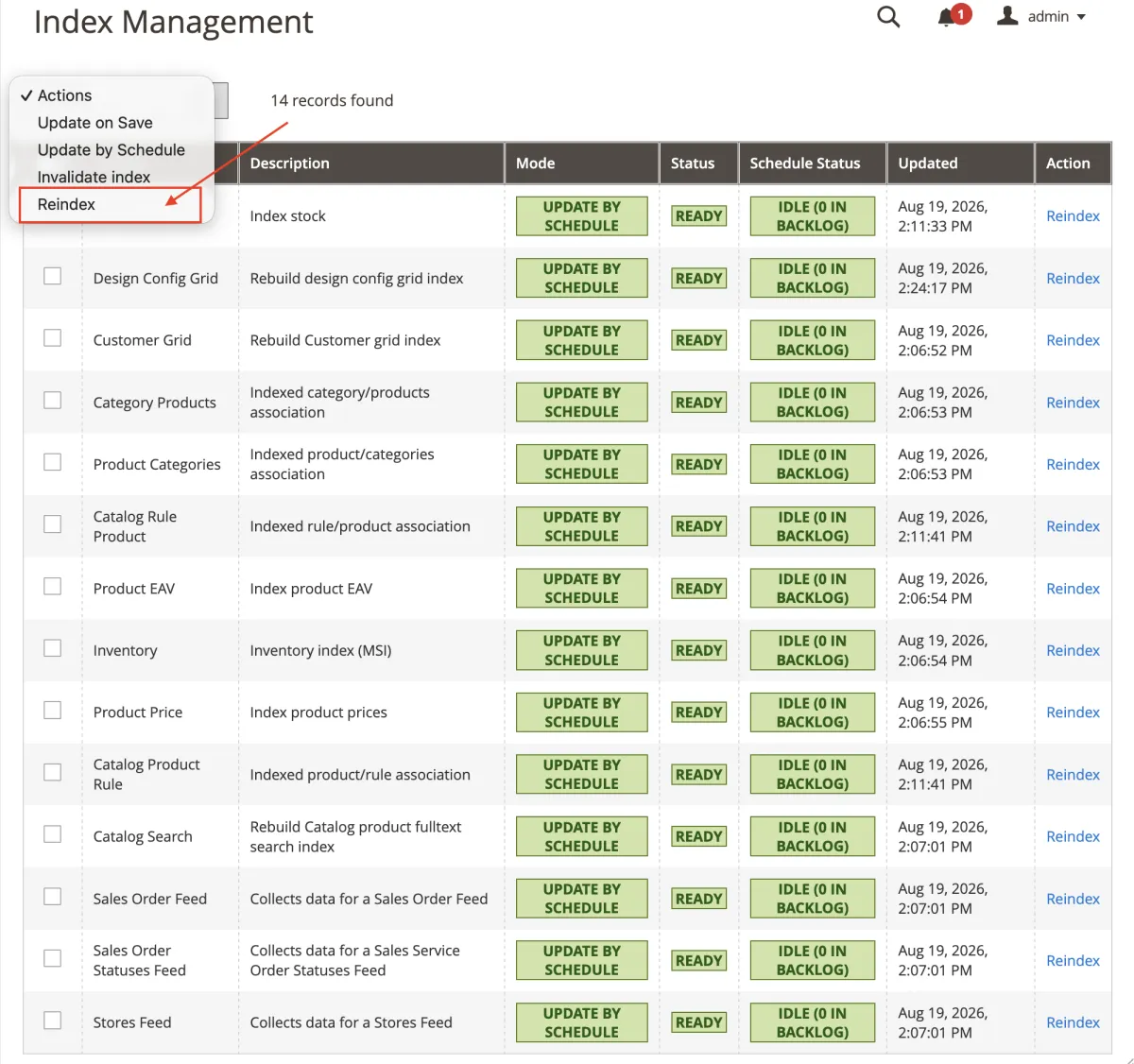
Indexer status and mode
The Status and Mode columns in the grid are part of core Magento, not this extension, but they tell you when a reindex is actually needed:
| Status or mode | Meaning |
|---|---|
| Ready | The index is up to date. No action needed. |
| Reindex required | The underlying data has changed since the last reindex. Use the Reindex action to rebuild it now, or wait for the next scheduled cron run (if Mode is Update by Schedule). |
| Processing | A reindex is running for that indexer (possibly started by cron or the command line). |
| Update on Save | The indexer rebuilds immediately whenever related data is saved. |
| Update by Schedule | The indexer rebuilds through a scheduled cron job. Reindex from Admin lets you force an immediate rebuild instead of waiting. |
Uninstallation
php bin/magento module:disable Magexweb_Reindexmanager- Remove the module files (
composer remove magexweb/reindexmanager, or deleteapp/code/Magexweb/Reindexmanager). php bin/magento setup:upgrade && php bin/magento cache:flush
Troubleshooting and FAQ
Does this extension replace Magento's cron-based reindexing?
No. Scheduled reindexing through cron keeps working exactly as before. The extension adds a manual, on-demand option for when you don't want to wait for the next scheduled run.
Will a mass reindex stop if one indexer fails?
No. Each selected indexer is processed on its own. If one fails, the extension logs the error and continues with the rest, then reports a combined success and failure count.
Can I limit who is allowed to trigger a reindex?
Yes. Use the Reindex Selected Indexers permission under System → Permissions → User Roles, as described in Setting admin permissions.
Why does the admin page seem to hang after I click Reindex?
The reindex runs in the same request, so the browser waits until it finishes before reloading the grid. For large catalogs, a full reindex of some indexers (such as Catalog Product Price or Full Text Search) can take a while. This is expected.
Where can I see error details if a reindex fails?
Check the Magento system and exception log files (usually in var/log/). The extension logs the underlying error there, as well as showing a summary message in the Admin Panel.
Support
For help, email info@magexweb.com.