

Free Shipping Bar for Magento 2
Most shoppers never notice a store’s free shipping policy until they hit checkout — by then it’s too late to influence their cart. Free Shipping Bar puts that incentive front and center, showing a live, on-brand progress bar that tells customers exactly how much more they need to spend to unlock free shipping, updating instantly as they shop — no page reload required.
Key Features
- Live AJAX progress bar with optional percentage badge
- Different thresholds & messages per customer group
- 4 display positions + sticky, auto-hide & close button options
- Full design control: colors, fonts, and custom CSS
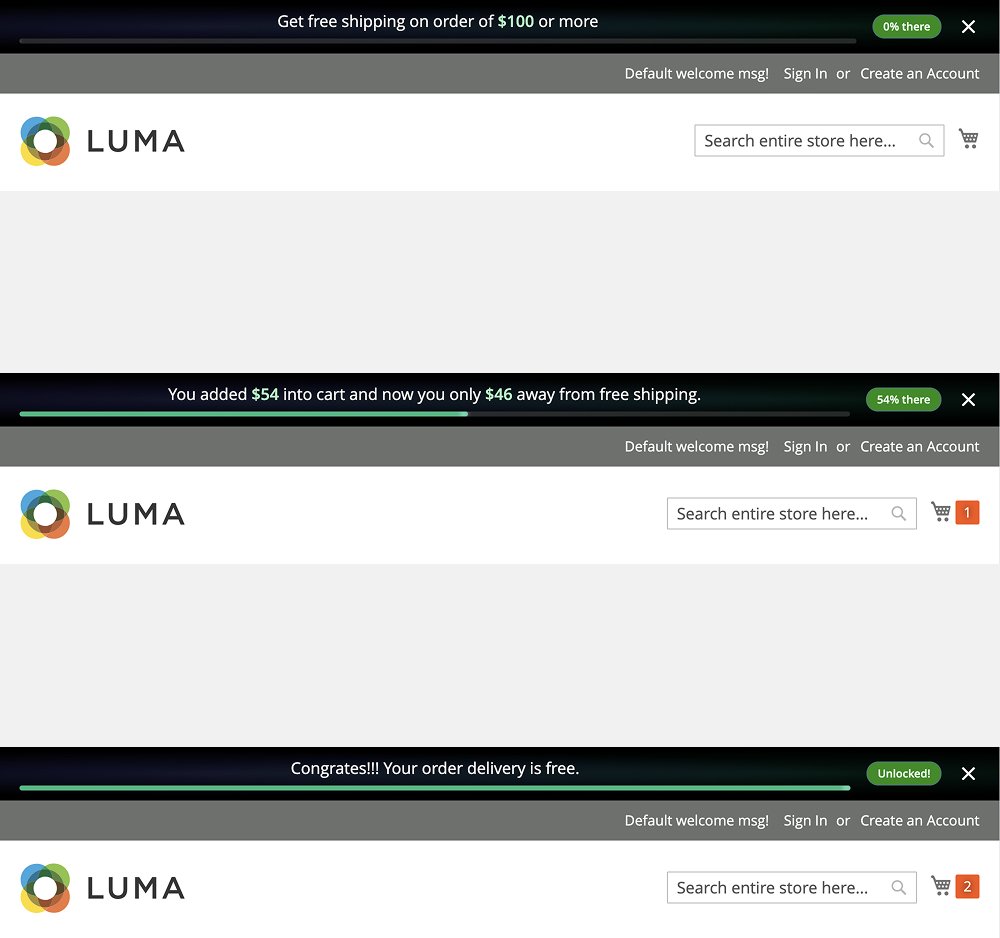
Free Shipping Bar - Frontend Bar
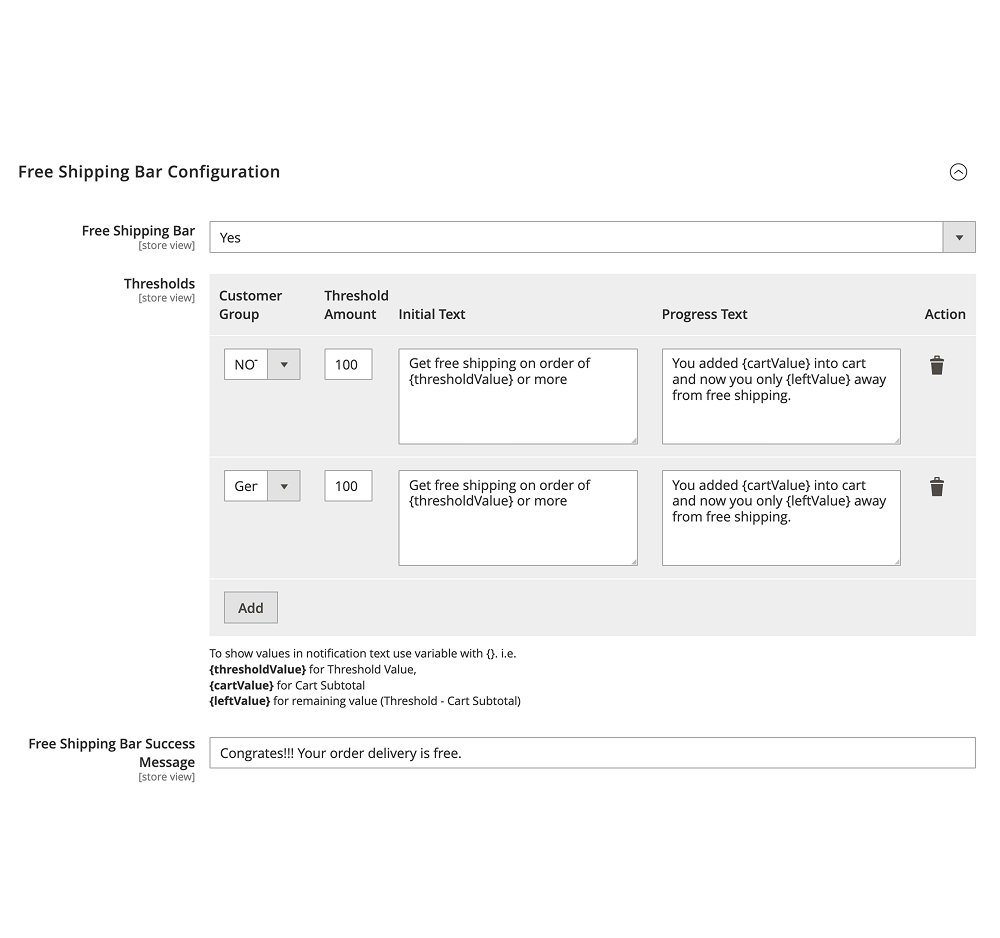
Admin - Free Shipping Bar General Configuration
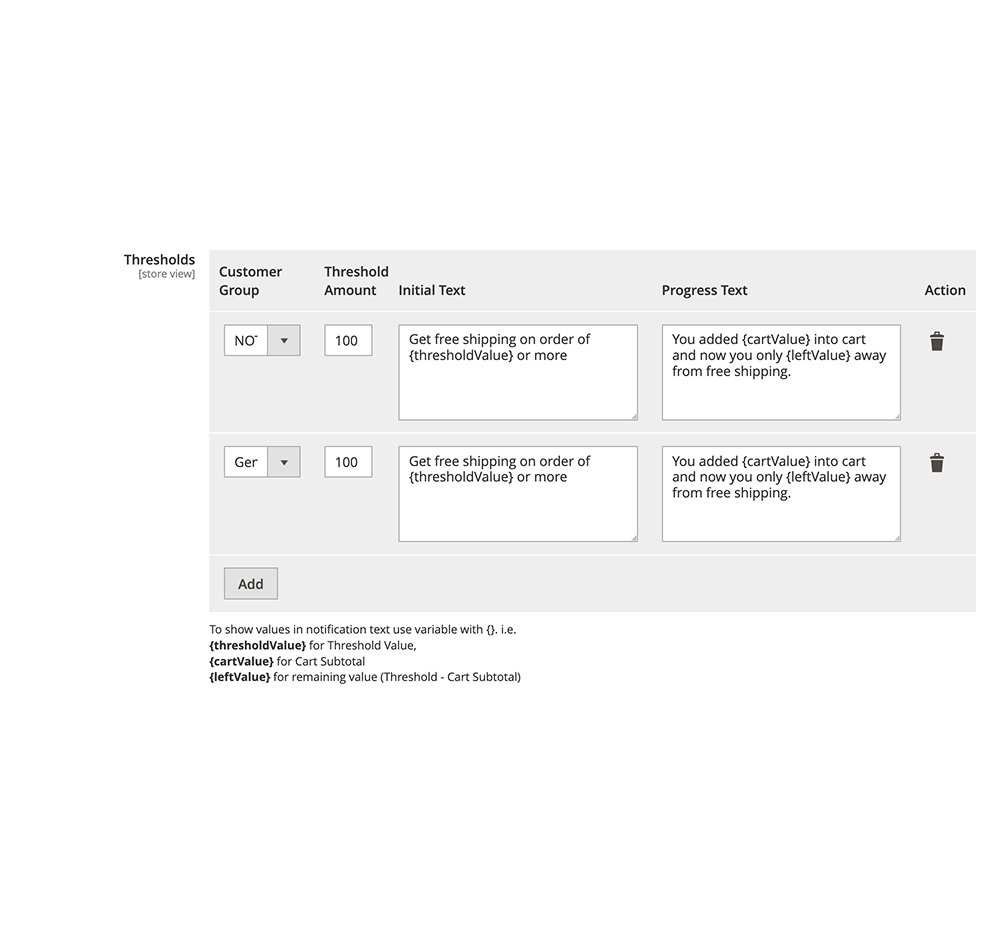
Admin - Free Shipping Bar Threshold Settings
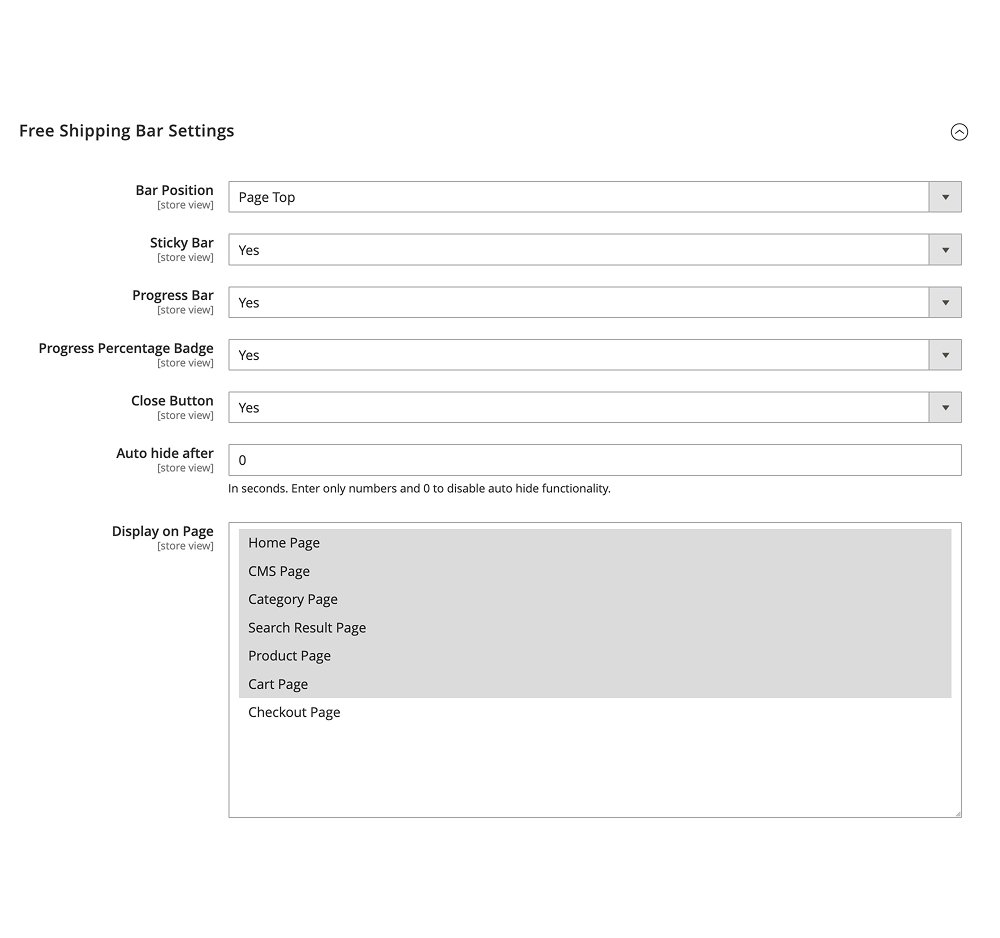
Admin - Free Shipping Bar Settings
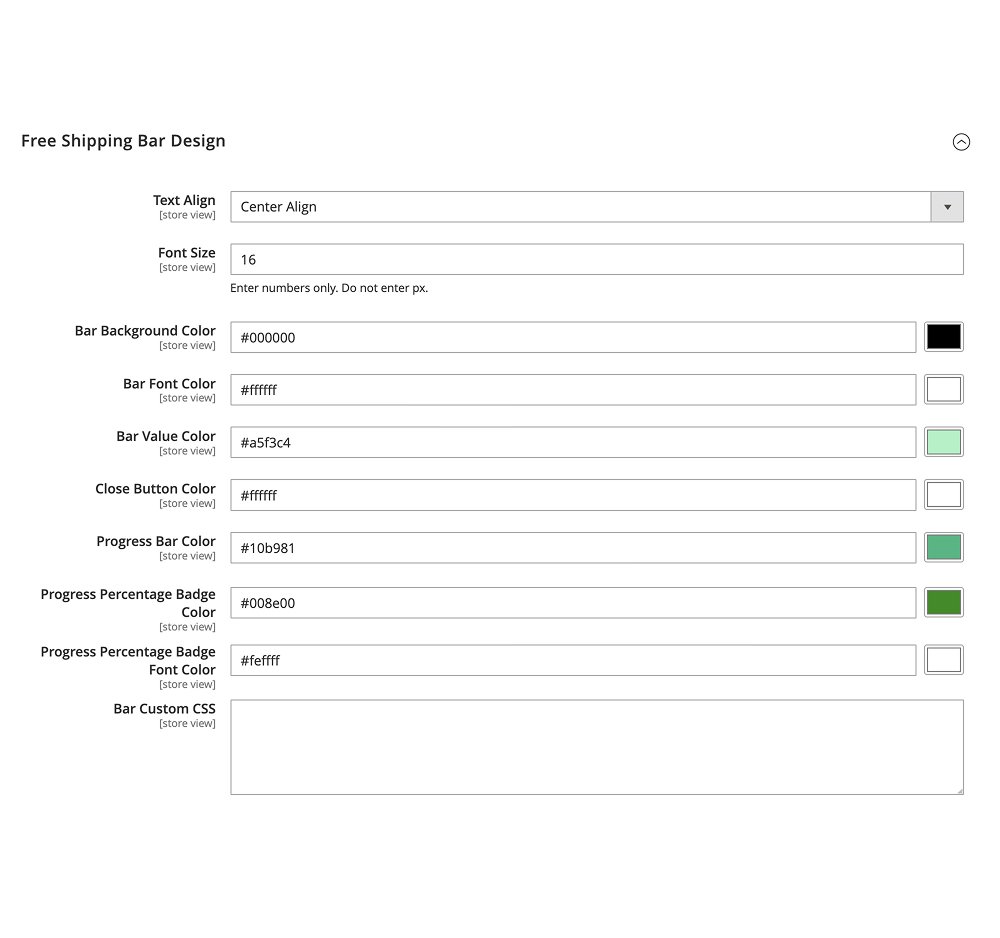
Admin - Free Shipping Bar Design Settings


Magento 2 Free Shipping Bar Extension Functionality
Turn your free shipping policy into a visible, real-time incentive. By default, Magento gives shoppers no way to know how close they are to qualifying for free shipping until they reach checkout — and by then, the moment to add “just one more item” has usually already passed. Free Shipping Bar solves this by placing a dynamic notification bar directly on your storefront, so the incentive works while customers are still browsing and adding to cart, not after.
The bar automatically compares each shopper’s current cart subtotal against the free-shipping threshold you set, and displays one of three fully customizable messages: an initial message inviting them to start shopping, a progress message telling them exactly how much more they need to spend, and a success message once they’ve unlocked free shipping. Everything updates live via AJAX the moment a product is added to the cart — no page refresh needed. Set different thresholds and wording per customer group (Guest, General, Wholesale, and more), choose from four display positions, and fine-tune every color, font, and style detail — including a custom CSS field for advanced control — so the bar matches your brand perfectly.
Free Shipping Bar Extension Features






Customer Reviews
FAQs
No, the bar is a notification and marketing tool. You’ll still need an active Free Shipping method or cart price rule in Magento with a matching minimum order amount — the bar’s threshold should mirror that rule so customers see accurate messaging.
Yes. The Thresholds grid lets you add a separate row per customer group, each with its own amount, initial message, and progress message.
Yes, the message and progress bar update instantly via AJAX whenever a product is added to the cart.
Yes. Use the Display on Page setting to choose from Home, Category, Product, Search Results, Cart, Checkout, and CMS pages individually.
Yes, if you enable the Close Button option. You can also set an auto-hide timer so the bar disappears on its own after a set number of seconds.
Yes. You can fully customize text alignment, font size, background/text/value colors, progress bar and badge colors, and add custom CSS for anything beyond the built-in options.
No. All configuration — thresholds, messages, positions, and design — is handled from the Magento Admin Panel under Stores > Configuration > Magexweb Extensions > Free Shipping Bar Configuration.
Changelog
- Fixed admin permissions and the admin menu
- Customer groups without a threshold no longer see "Unlocked!"
- Amounts formatted in the customer's currency, and the subtotal calculated the same way as the Free Shipping method
- The close button follows its setting
- Security hardening: settings validated on save, messages and styles sanitized, safer admin script fewer requests and faster rendering
- Translations and unit tests added
- Enhanced notification bar design
- Real-time progress bar updates without page refresh
- Added new notification bar elements, including a progress bar and percentage badge
- Admin settings to customize the notification bar design without code changes
- Minor version change
- Initial release
Daniel Carter –
The Free Shipping Bar is a really helpful feature on our Magento 2 store. The progress bar changes away when items get added to the cart and the various messages make the free shipping deal much easier for customers to see. The Free Shipping Bar helps customers know how close they are to getting shipping. The messages change as the customer adds items. This makes the free shipping offer stand out more. The Free Shipping Bar is easy to use. It works well. It gives customers an idea of what they need to do to get free shipping. The Free Shipping Bar is a choice, for any store that wants to encourage more sales.
Michael Anderson –
It is very easy to set up from the Magento admin panel. I especially enjoy the ability to set shipping thresholds for each customer group. The customization options also let me match the bar to our store design, with ease.
Sophia Williams –
We were looking for a way to help customers spend more and this extension does just that. The live progress message shows shoppers how much more they need to spend to get free shipping. It’s simple. Works well.
James Wilson –
The extension was easy to set up. It works well with AJAX updates,. There is no need to refresh the page. Being able to choose which pages show the shipping bar is a feature. It gives control over how the shipping information appears.
Emma Thompson –
A clean and practical Magento 2 extension. The design settings offer a lot of flexibility. We were able to customize the colors the text, the position and the progress bar to fit our storefront. The extension works well. Meets our needs. It is easy to use and gives us the control we wanted. We are happy with the results. The extension is reliable. Does what it is supposed to do. It is a choice, for anyone looking for a simple and effective solution. We recommend it.
Oliver Martin –
We were searching for a way to highlight our free shipping threshold and this extension worked really well. The percentage indicator and the message about how much more needed make the offer much easier for shoppers to get. We were searching for a way to highlight our free shipping threshold and this extension worked really well. The percentage indicator and the message, about how much more needed make the offer much easier for shoppers to get.
William Brown –
Good add on with settings. The feature to display messages depending on how close a customer is to getting free shipping makes it more interesting than a plain old message bar. This feature helps customers feel more involved and gives them a reason to keep shopping. The idea of showing messages is really smart. It makes the experience better for the customer. The message bar is not a simple notice anymore.