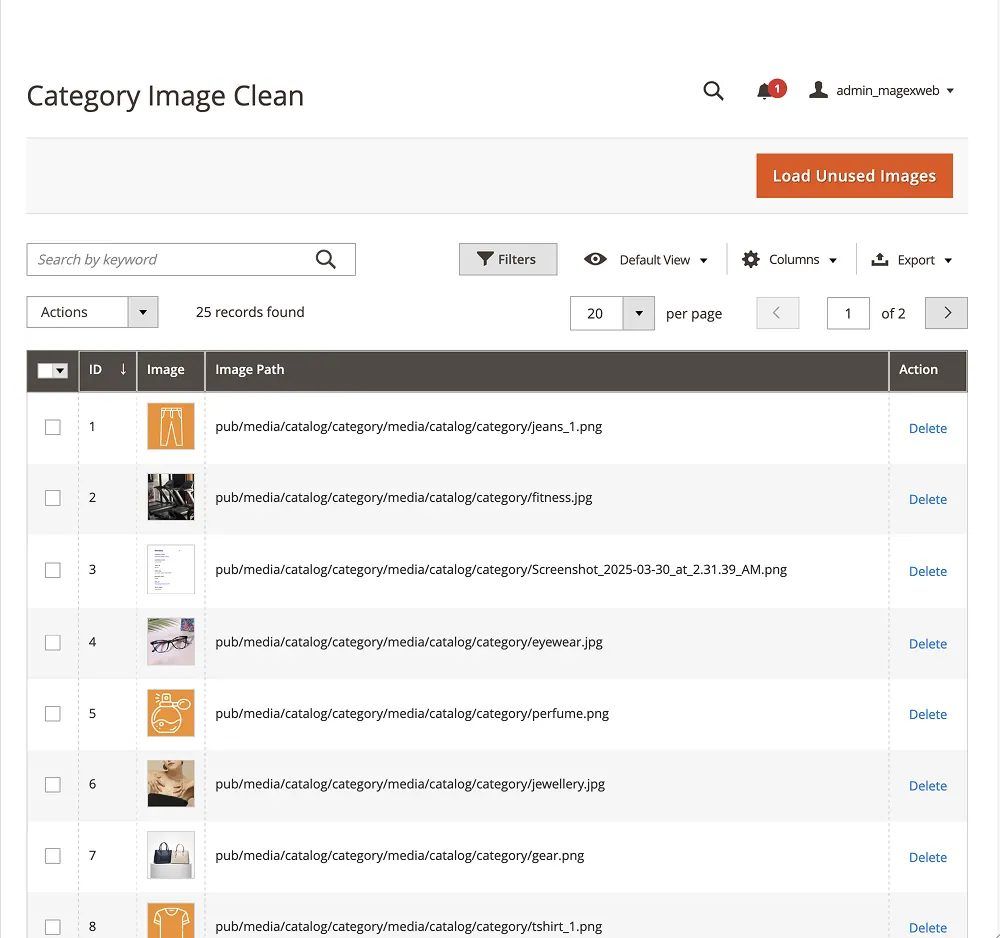
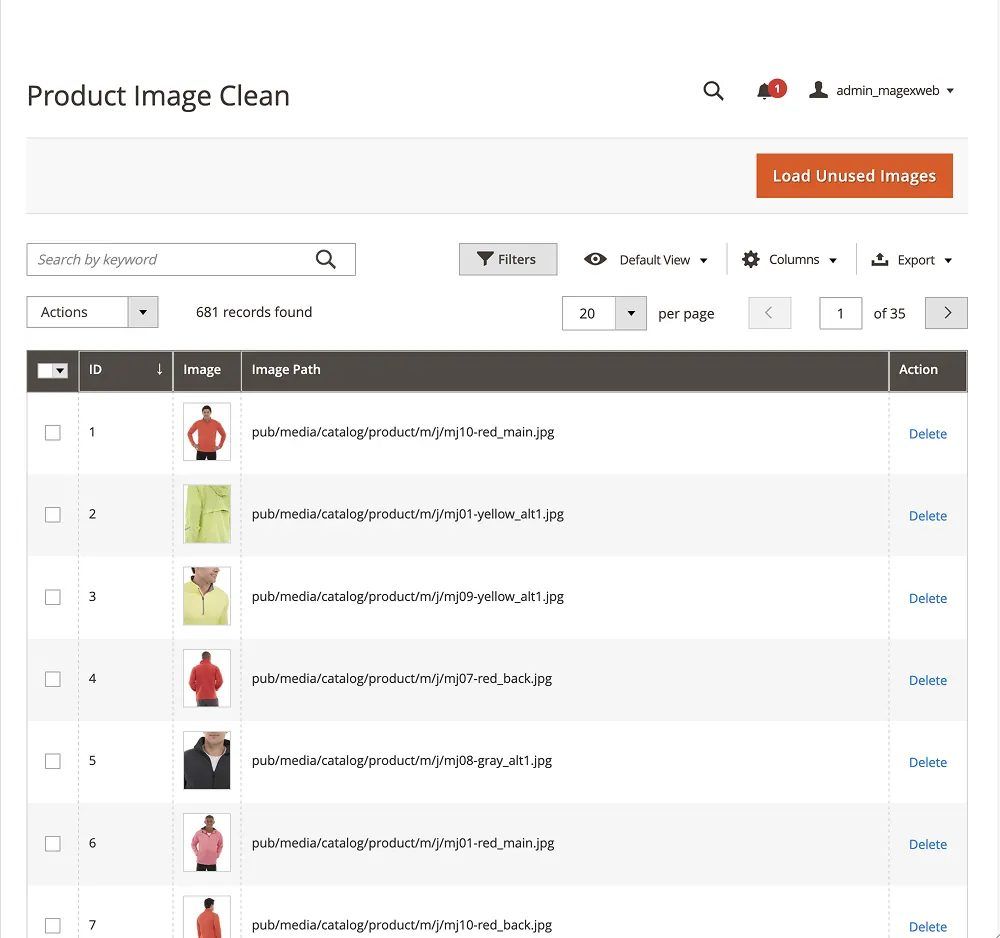
Unused product images
Finds images in pub/media/catalog/product that no longer match any product in your database.
 Mage-OS compatible
Find the orphan product and category images left on your server, review them in one grid, and delete them in a couple of clicks.
 Adobe Marketplace approved

Magento never deletes product or category images when a product is removed or its image replaced. Image Cleaner compares the files in your media folders with your live product and category records and lists every unused image.
Click Load Unused Images in the Magento admin to compare your image files with your product and category records.
Every unused image is listed in a grid. Export it to CSV to keep a record.
Remove one image, or select several and delete them at once.
Scan the media folders to list the images nothing uses.
| Image file | Size | |
|---|---|---|
pub/media/catalog/product/t/o/tote-blue-old.jpg | 412 KB | |
pub/media/catalog/product/d/e/desk-lamp_1.jpg | 268 KB | |
pub/media/catalog/product/w/o/wool-throw-2019.png | 1126 KB | |
pub/media/catalog/product/c/a/canvas-bag_3.jpg | 304 KB | |
pub/media/catalog/category/summer-sale-banner.jpg | 520 KB | |
pub/media/catalog/category/old-gear.png | 186 KB |
Images used only by custom image fields from other modules or themes need the detection customising, or they may be listed as unused.
It runs from the Magento admin and never deletes an image without you.
Finds images in pub/media/catalog/product that no longer match any product in your database.
Scans the category media folder and flags unused category images the same way.
Nothing is removed automatically. Check the full grid first, then delete one image or many at once.
Export the full list of unused images before cleanup, so you keep a record of what was removed.
Load Unused Images scans thousands of files in seconds, with no digging through folders.
Smaller media folders mean quicker backups and deployments, and less storage.
See it on a live store, then check the settings in the admin.
Log in to see every setting.
imagecleanerimagecleaner2025Every review on the store, unedited.
Average from 3 reviews
“We had old images left over after updating our product catalog. This extension helped us clean things up without spending hours checking files manually. Useful for ongoing store maintenance.”
“Our media folder had become cluttered over time. This extension made it easier to manage unused images. It handles a small but time-consuming part of maintaining our Magento store.”
“We replace products quite often, and image cleanup was something we kept putting off. This extension made the task more manageable. Glad we added it to our maintenance routine.”
Something else? Ask the team that built it.
No. The extension never deletes anything on its own. It lists orphan images in the admin grid, and you choose what to delete, one at a time or in bulk.
Both. Image Cleaner scans pub/media/catalog/product for unused product images and your category media folder for unused category images.
It compares every file in your catalog and category media directories with your live product and category database records. Any image with no matching record is flagged as orphaned.
Yes. It only reports orphan images and needs your confirmation before deleting, so there's no risk of accidentally removing an image that's still in use.
Yes. You can export the full orphan image list to CSV before you clean anything up.
Removing thousands of unused images reduces the media folder size, which speeds up backups, deployments and overall server performance, especially on large catalogs.
Yes. It supports Magento Open Source 2.4.x and is verified compatible with Adobe Commerce 2.4.8 and above.
Updates are free for every customer.
Magexweb is a Magento development agency with 10+ years of experience. The developers who wrote the extension answer your support questions.
See the refund policy for the terms.
Choose longer support when you buy.
Every new version at no extra cost.
Add it for $20 and we set it up on your store.
$25 Was$29Save $4
Need it to work differently? Ask for a custom version.
From the same team, with the same support.

Show shoppers how close they are to free shipping.
Mage-OS compatible $34 Was $39

More control over how Magento 2 category pages look and work.
Mage-OS compatible $34 Was $39

Run Magento 2 reindexing from the admin panel, no command line needed.
Mage-OS compatibleQuestions about this extension, or one built for your own workflow? The team that wrote it will reply by email.