
Overview
Advance Blog is a Magento 2 extension from Magexweb that adds a complete, SEO-friendly blog to your store. Write articles with the familiar Magento editor or Page Builder, organise them with categories, authors and tags, let customers comment, and link articles to products so that your content helps you sell.
Content marketing brings visitors from search engines and social media, answers your customers' questions and builds trust in your brand. Advance Blog keeps that content inside your store, next to your products, so readers are always one click away from buying.
Important: blog pages are cached by Magento's full page cache. After you change the configuration, flush the cache in System > Cache Management so the storefront shows the new settings. Scheduled posts are published by Magento cron, so make sure cron is running.
Key features
- Posts with featured image, WYSIWYG or Page Builder content, short description, scheduled publishing and a Featured flag
- Nested categories with banner image, author profiles (photo, biography, social links) and tags
- Assign every post, category, author and tag to all store views or to specific store views
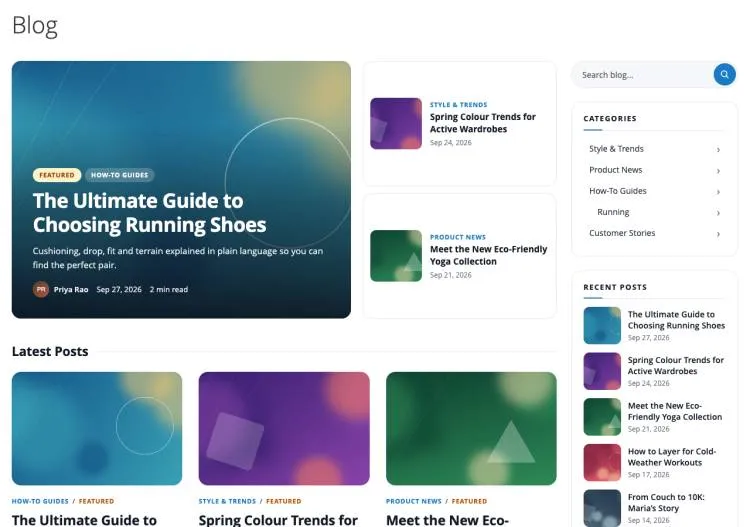
- Three listing layouts (Grid, List, Magazine) and three grid post box designs (Classic Card, Image Overlay, Minimal Editorial)
- Featured posts hero on the blog home, popular posts based on real views, related posts and related products
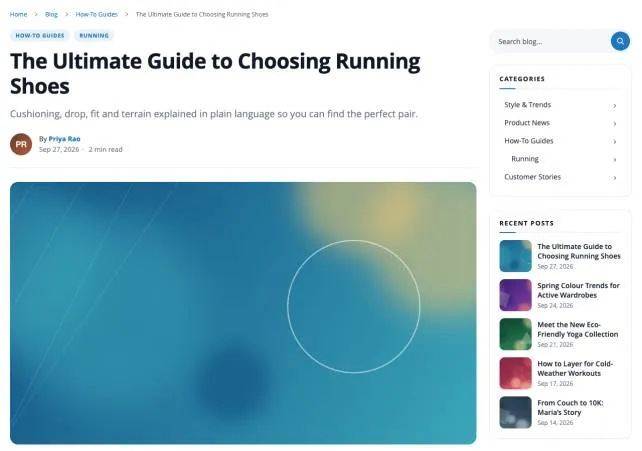
- Table of contents, reading time, reading progress bar, social sharing buttons and previous / next post links
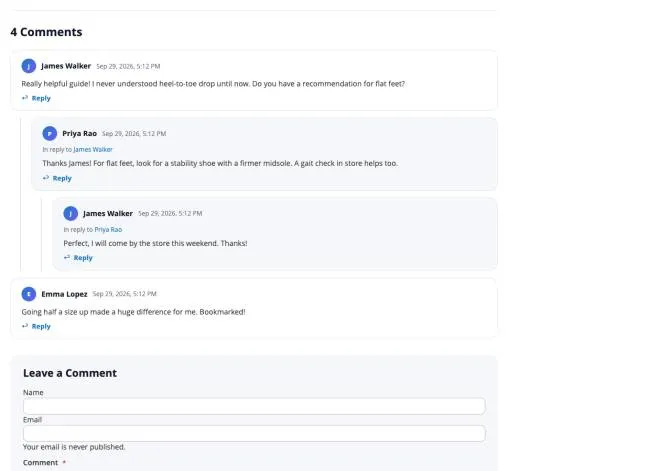
- Threaded comments with unlimited reply levels, moderation, guest comments, email notifications and spam protection (honeypot, rate limit, Google reCAPTCHA)
- SEO-friendly URLs with optional suffix and automatic 301 redirects when a URL changes
- Meta tags, canonical URLs, Open Graph and Twitter / X cards, JSON-LD structured data, XML sitemap and RSS feed
- 8 CMS widgets and a Page Builder "Blog Posts" element
- Related articles on product pages
- Admin dashboard, sample data and a REST API
- Full page cache and Varnish compatible
How it works
Once installed, the blog is available at www.yourstore.com/blog (the path is configurable) and a Blog link is added to the top menu. Customers can:
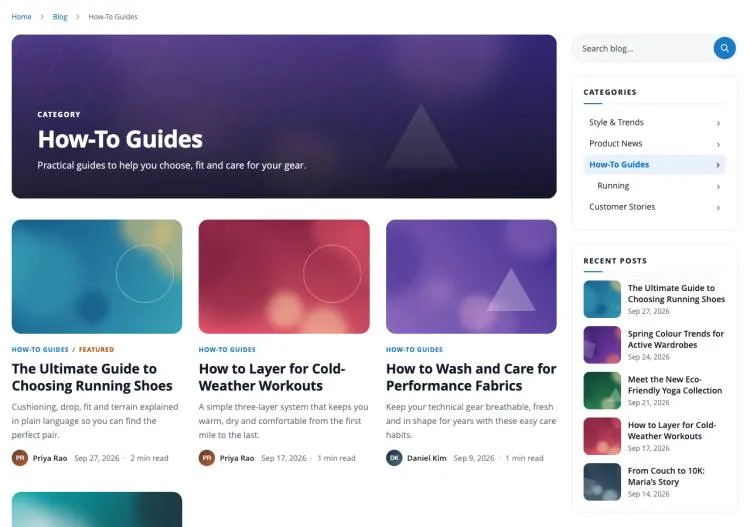
- Browse the latest posts on the blog home, with the featured posts at the top and a sidebar with search, categories, recent posts and tags.
- Read a post, with its categories, author, reading time, featured image and table of contents.
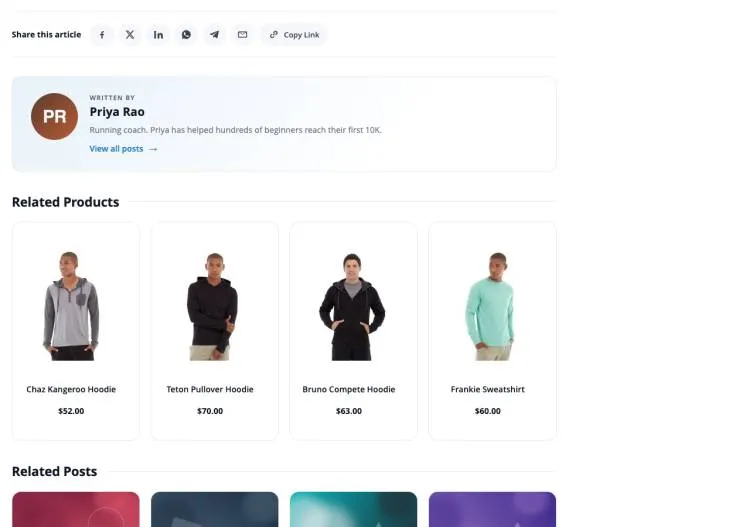
- Share the post, discover the author and related products, and join the conversation in the comments, where replies appear under the comment they answer.
Requirements and compatibility
| Item | Detail |
|---|---|
| Platform | Magento Open Source or Adobe Commerce 2.4.8 and 2.4.9 |
| PHP | 8.1 to 8.5 (as supported by your Magento version) |
| Cron | Magento cron must be running (scheduled posts, popular post statistics, URL rewrites) |
| Optional | Magento Page Builder for the "Blog Posts" element; Magento's Google reCAPTCHA modules for the comment form |
| Module code | Magexweb_Advanceblog |
| Composer package | magexweb/advanceblog |
| License | Open Software License 3.0 (OSL-3.0) |
Installation
Composer installation (recommended)
- Place the extension in your project (via the Adobe Commerce Marketplace, a private Composer repository, or by copying it under
app/code). - From the Magento root, run the following commands:
| Command | Purpose |
|---|---|
composer require magexweb/advanceblog | Only if distributed via a Composer repository (Marketplace) |
php bin/magento module:enable Magexweb_Advanceblog | Registers and enables the module |
php bin/magento setup:upgrade | Creates the blog tables and the blog URL rewrites |
php bin/magento setup:di:compile | Recommended for production mode |
php bin/magento setup:static-content:deploy -f | Required in production mode |
php bin/magento cache:flush | Clears the Magento cache |
Manual (ZIP) installation
- Extract the ZIP package to
app/code/Magexweb/Advanceblogin your Magento installation, so thatapp/code/Magexweb/Advanceblog/registration.phpexists. - Run the same
bin/magentocommands listed above (module:enable, setup:upgrade, di:compile, static-content:deploy, cache:flush). - Check the module is active:
php bin/magento module:status Magexweb_Advanceblog
Sample data
Install the sample data to see the blog in action straight away: 9 posts with images, 5 categories, 3 authors, 7 tags and a comment conversation. If your catalog has products, each post is linked to some of them.
| Command | Purpose |
|---|---|
php bin/magento magexweb:advanceblog:sample-data:install | Installs the sample posts, categories, authors, tags, comments and images |
php bin/magento magexweb:advanceblog:sample-data:remove | Removes exactly what was installed (your own content is never touched) |
Note: if a URL key of the sample data is already used in your store, the sample item gets a numbered URL key (for example running-2) instead of replacing your content.
After installing
- Check the settings in Stores > Settings > Configuration > Magexweb Extensions > Advance Blog (see Admin configuration).
- Add your first post under Advance Blog > Posts, or install the sample data (see Managing blog content).
- Open the blog at
www.yourstore.com/blog.
Admin configuration
All settings live under Stores > Settings > Configuration > Magexweb Extensions > Advance Blog. Use the Scope switcher at the top of the page to use different settings for a website or store view.
General
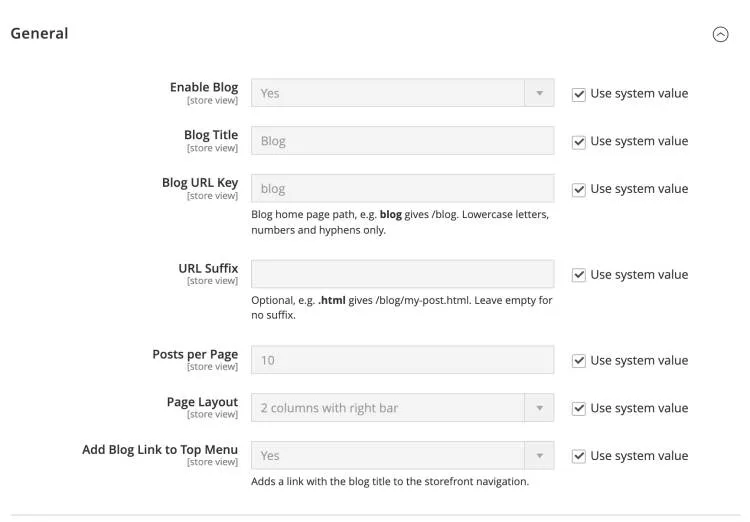
| Field | Description |
|---|---|
| Enable Blog | Master switch. Set to Yes to show the blog on your storefront, or No to hide the blog pages and links for this store view. Default: Yes |
| Blog Title | Name of the blog. Used as the blog home heading, in breadcrumbs, the top menu link, page titles and the RSS feed. Default: Blog |
| Blog URL Key | Blog home page path, e.g. blog gives /blog. Lowercase letters, numbers and hyphens only.Default: blog |
| URL Suffix | Optional, e.g. .html gives /blog/my-post.html. Leave empty for no suffix.Default: (empty) |
| Posts per Page | Number of posts on each page of the blog home, category, author, tag and search pages. Further posts are split into pages. Default: 10 |
| Page Layout | Page layout of all blog pages. Choose a layout with a sidebar to show the blog sidebar (search, categories, recent posts, tags). Default: 2 columns with right bar |
| Add Blog Link to Top Menu | Adds a link with the blog title to the storefront navigation. Default: Yes |
SEO
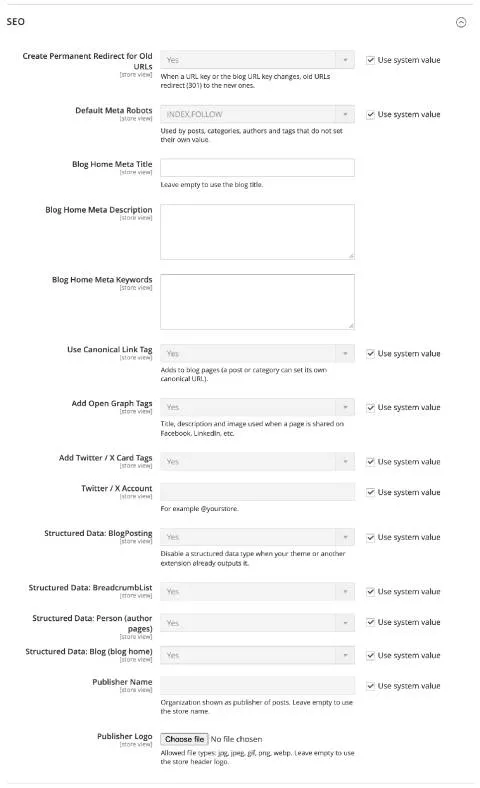
| Field | Description |
|---|---|
| Create Permanent Redirect for Old URLs | When a URL key or the blog URL key changes, old URLs redirect (301) to the new ones. Default: Yes |
| Default Meta Robots | Used by posts, categories, authors and tags that do not set their own value. Default: INDEX, FOLLOW |
| Blog Home Meta Title | Leave empty to use the blog title. Default: (empty) |
| Blog Home Meta Description | Meta description of the blog home page, shown by search engines under the page title. Default: (empty) |
| Blog Home Meta Keywords | Meta keywords of the blog home page (optional; most search engines ignore them). Default: (empty) |
| Use Canonical Link Tag | Adds a canonical link to blog pages (a post or category can set its own canonical URL). Default: Yes |
| Add Open Graph Tags | Title, description and image used when a page is shared on Facebook, LinkedIn, etc. Default: Yes |
| Add Twitter / X Card Tags | Adds Twitter / X card tags so shared links show a large preview with the title, description and featured image. Default: Yes |
| Twitter / X Account | For example @yourstore.Default: (empty) |
| Structured Data: BlogPosting | Disable a structured data type when your theme or another extension already outputs it. Default: Yes |
| Structured Data: BreadcrumbList | Adds breadcrumb structured data (JSON-LD) so search engines can show the page path in results. Default: Yes |
| Structured Data: Person (author pages) | Adds Person structured data on author pages (name, image, biography and social profiles). Default: Yes |
| Structured Data: Blog (blog home) | Adds Blog structured data on the blog home page. Default: Yes |
| Publisher Name | Organization shown as publisher of posts. Leave empty to use the store name. Default: (empty) |
| Publisher Logo | Allowed file types: jpg, jpeg, gif, png, webp. Leave empty to use the store header logo. Default: (empty) |
XML Sitemap
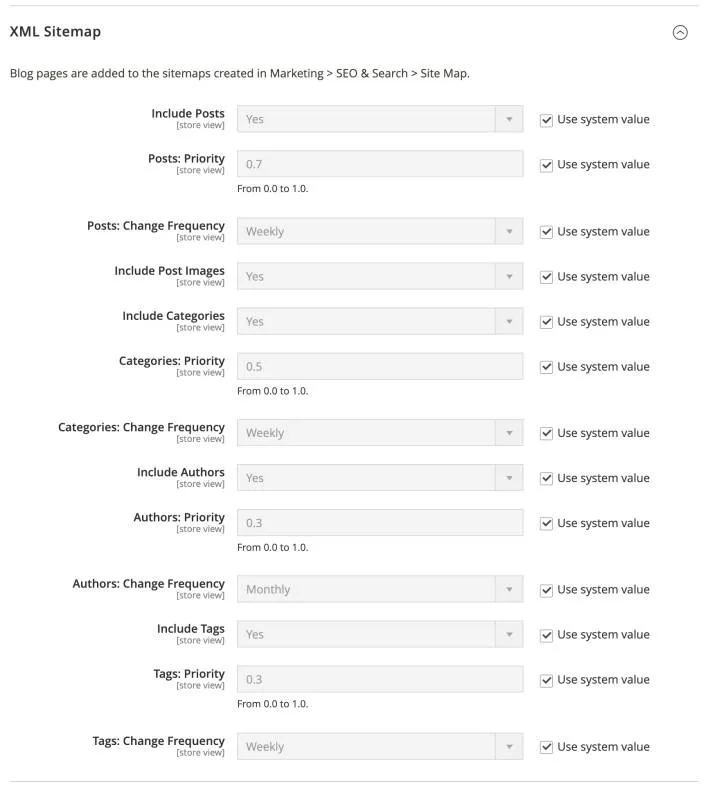
| Field | Description |
|---|---|
| Include Posts | Adds published posts to the XML sitemap generated in Marketing > Site Map. Default: Yes |
| Posts: Priority | From 0.0 to 1.0. Default: 0.7 |
| Posts: Change Frequency | How often search engines should expect post pages to change. Default: Weekly |
| Include Post Images | Adds the featured image of each post to the sitemap, so search engines can find it for image search. Default: Yes |
| Include Categories | Adds blog category pages to the XML sitemap. Default: Yes |
| Categories: Priority | From 0.0 to 1.0. Default: 0.5 |
| Categories: Change Frequency | How often search engines should expect category pages to change. Default: Weekly |
| Include Authors | Adds author pages to the XML sitemap. Default: Yes |
| Authors: Priority | From 0.0 to 1.0. Default: 0.3 |
| Authors: Change Frequency | How often search engines should expect author pages to change. Default: Monthly |
| Include Tags | Adds tag pages to the XML sitemap. Default: Yes |
| Tags: Priority | From 0.0 to 1.0. Default: 0.3 |
| Tags: Change Frequency | How often search engines should expect tag pages to change. Default: Weekly |
RSS Feed
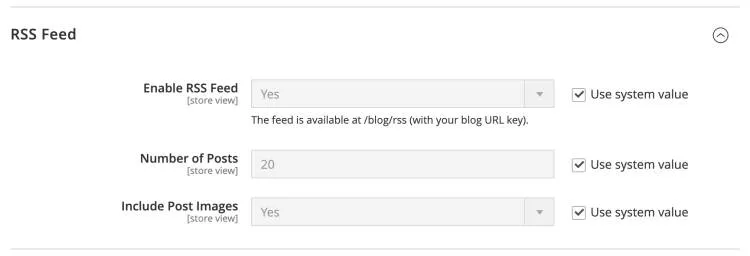
| Field | Description |
|---|---|
| Enable RSS Feed | The feed is available at /blog/rss (with your blog URL key).Default: Yes |
| Number of Posts | Number of latest posts included in the RSS feed. Default: 20 |
| Include Post Images | Adds the featured image of each post to its feed entry. Default: Yes |
Post Listing
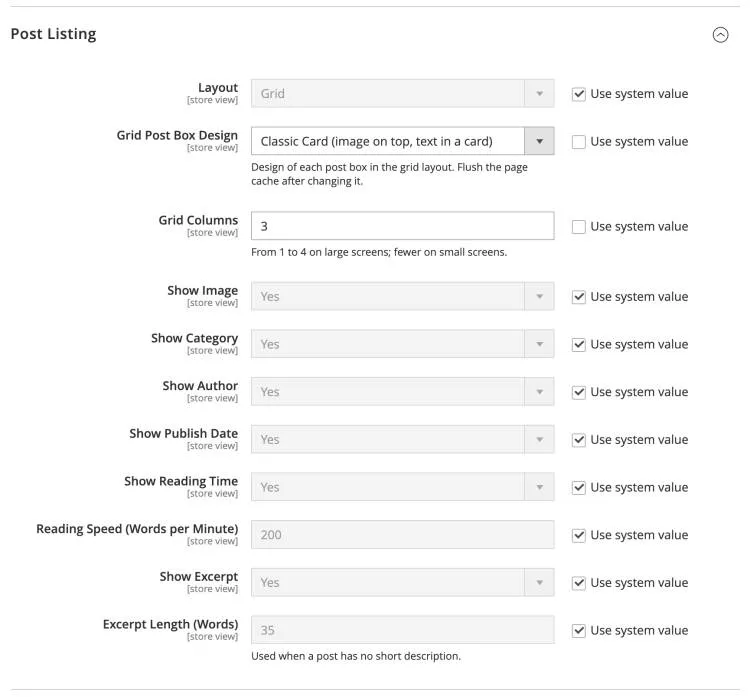
| Field | Description |
|---|---|
| Layout | Layout of post lists (blog home, category, author, tag and search pages): Grid (cards in columns), List (image beside text) or Magazine (a large first post with a grid below). Default: Grid |
| Grid Post Box Design | Design of each post box in the grid layout: Classic Card, Image Overlay or Minimal Editorial. Flush the page cache after changing it. Default: Classic Card (image on top, text in a card) |
| Grid Columns | From 1 to 4 on large screens; fewer on small screens. Default: 3 |
| Show Image | Shows the post thumbnail (or featured image) in post lists. Default: Yes |
| Show Category | Shows the first category of each post as a label. Default: Yes |
| Show Author | Shows the author name and photo under each post. Default: Yes |
| Show Publish Date | Shows the publish date of each post. Default: Yes |
| Show Reading Time | Shows the estimated reading time, for example "4 min read". Default: Yes |
| Reading Speed (Words per Minute) | Words per minute used to calculate the reading time. Default: 200 |
| Show Excerpt | Shows a short text under the title: the post's Short Description, or the beginning of its content. Default: Yes |
| Excerpt Length (Words) | Used when a post has no short description. Default: 35 |
Post Page
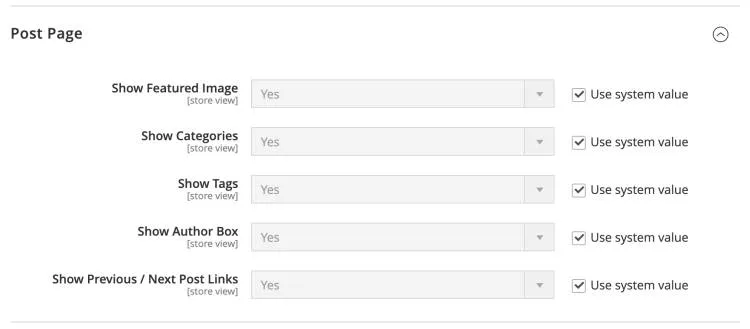
| Field | Description |
|---|---|
| Show Featured Image | Shows the featured image at the top of the post page. Default: Yes |
| Show Categories | Shows the post's categories as labels above the title. Default: Yes |
| Show Tags | Shows the post's tags under the content. Default: Yes |
| Show Author Box | Shows the "Written by" box with the author's photo, short bio and a link to all their posts. Default: Yes |
| Show Previous / Next Post Links | Shows links to the previous and next posts at the end of the post. Default: Yes |
Related Posts
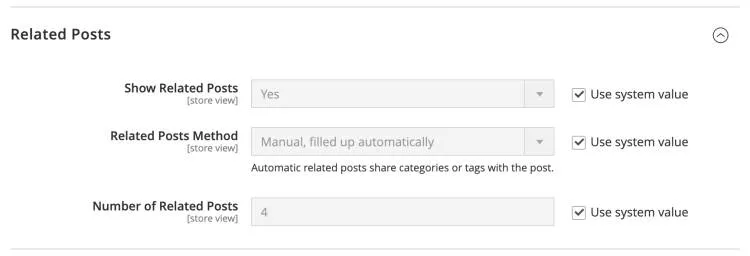
| Field | Description |
|---|---|
| Show Related Posts | Shows a "Related Posts" section under the post. Default: Yes |
| Related Posts Method | Manual selection, automatic, or manual filled up automatically. Automatic related posts share categories or tags with the post. Default: Manual, filled up automatically |
| Number of Related Posts | Maximum number of related posts shown. Default: 4 |
Related Products
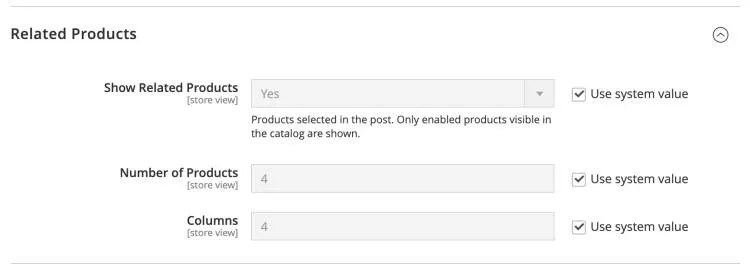
| Field | Description |
|---|---|
| Show Related Products | Shows the products selected in the post. Only enabled products visible in the catalog are shown. Default: Yes |
| Number of Products | Maximum number of related products shown on the post page. Default: 4 |
| Columns | Number of product columns on large screens. Default: 4 |
Featured Posts
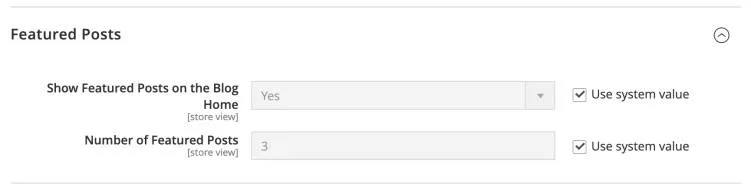
| Field | Description |
|---|---|
| Show Featured Posts on the Blog Home | Shows posts marked as Featured in a large section at the top of the blog home. Default: Yes |
| Number of Featured Posts | Maximum number of featured posts shown on the blog home. Default: 3 |
Popular Posts
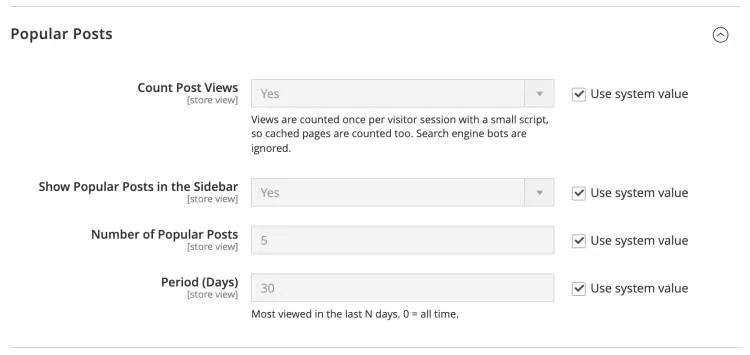
| Field | Description |
|---|---|
| Count Post Views | Views are counted once per visitor session with a small script, so cached pages are counted too. Search engine bots are ignored. Default: Yes |
| Show Popular Posts in the Sidebar | Shows the most viewed posts in the blog sidebar. Default: Yes |
| Number of Popular Posts | Maximum number of popular posts shown in the sidebar. Default: 5 |
| Period (Days) | Most viewed in the last N days. 0 = all time. Default: 30 |
Table of Contents
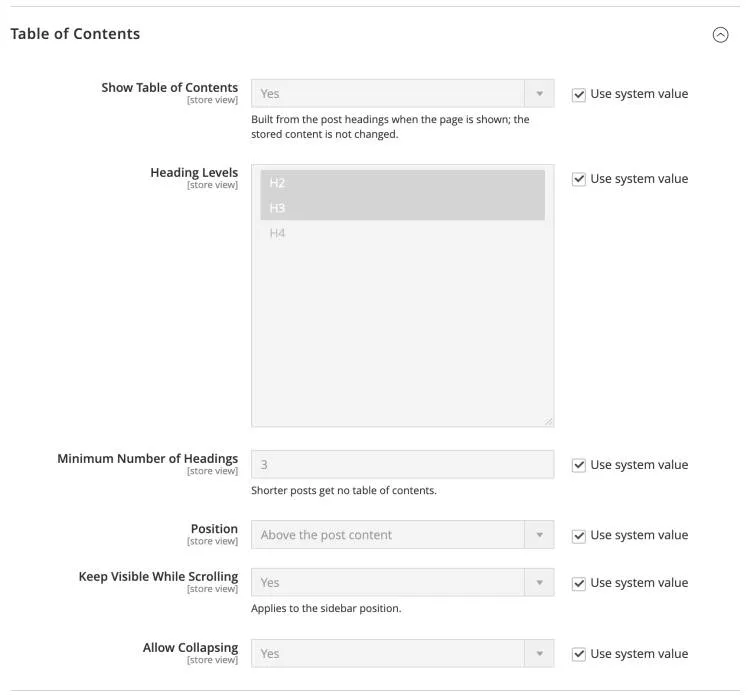
| Field | Description |
|---|---|
| Show Table of Contents | Built from the post headings when the page is shown; the stored content is not changed. Default: Yes |
| Heading Levels | Headings of the post content that are listed in the table of contents. Default: H2, H3 |
| Minimum Number of Headings | Shorter posts get no table of contents. Default: 3 |
| Position | Shows the table of contents above the post content or in the sidebar. Default: Above the post content |
| Keep Visible While Scrolling | Applies to the sidebar position. Default: Yes |
| Allow Collapsing | Lets customers open and close the table of contents. Default: Yes |
Social Sharing
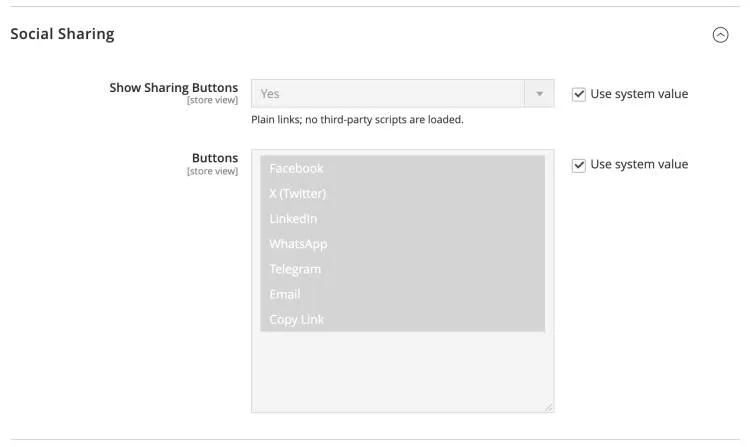
| Field | Description |
|---|---|
| Show Sharing Buttons | Plain links; no third-party scripts are loaded. Default: Yes |
| Buttons | Sharing buttons shown on the post page. Hold Ctrl (Cmd on Mac) to select several. Default: Facebook, X (Twitter), LinkedIn, WhatsApp, Telegram, Email, Copy Link |
Product Page: Related Articles
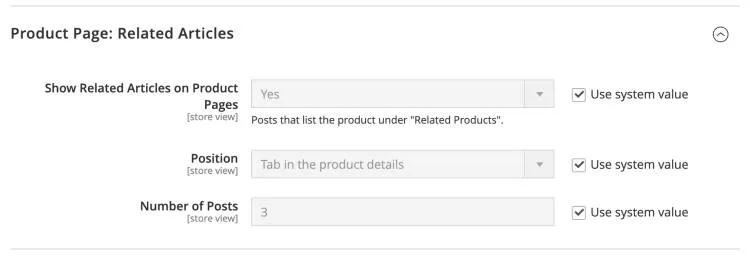
| Field | Description |
|---|---|
| Show Related Articles on Product Pages | Shows the posts that list the product under "Related Products". Default: Yes |
| Position | Shows the related articles as a tab in the product details, or below the product details. Default: Tab in the product details |
| Number of Posts | Maximum number of articles shown on a product page. Default: 3 |
| Section Title | Below the product details only. Leave empty for "Related Articles". Default: (empty) |
Sidebar
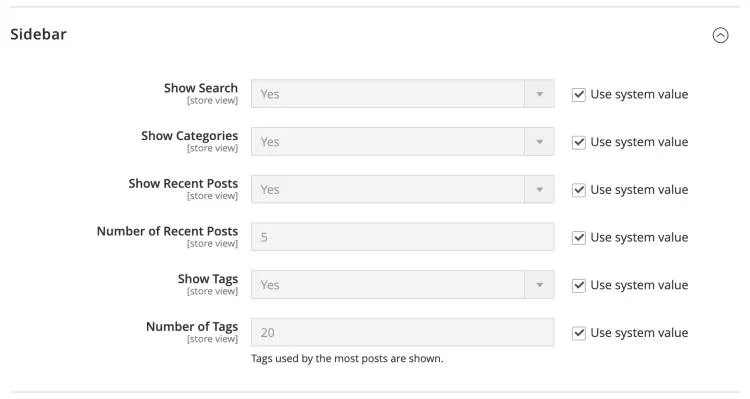
| Field | Description |
|---|---|
| Show Search | Shows the blog search box in the sidebar. Default: Yes |
| Show Categories | Shows the blog category tree in the sidebar. Default: Yes |
| Show Recent Posts | Shows the latest posts, with thumbnails, in the sidebar. Default: Yes |
| Number of Recent Posts | Number of recent posts shown in the sidebar. Default: 5 |
| Show Tags | Shows the tag cloud in the sidebar. Default: Yes |
| Number of Tags | Tags used by the most posts are shown. Default: 20 |
Comments
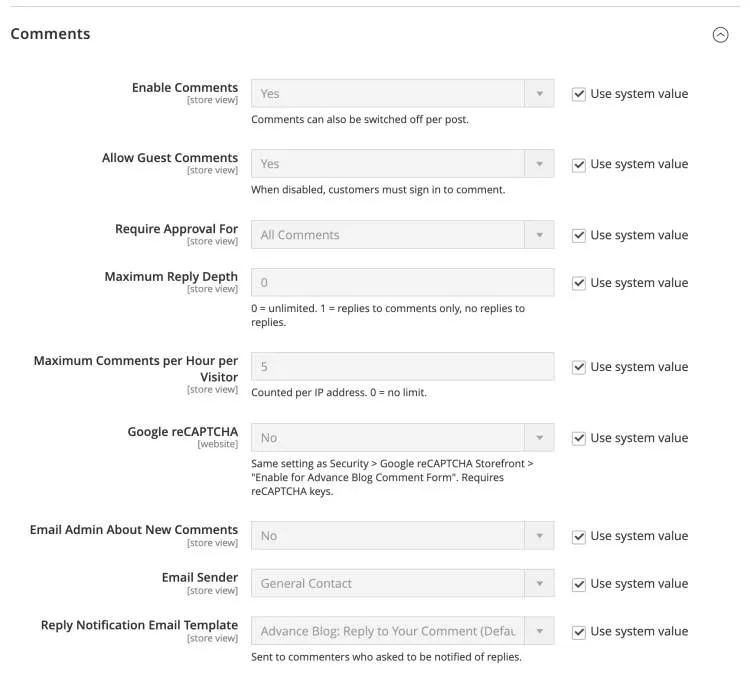
| Field | Description |
|---|---|
| Enable Comments | Comments can also be switched off per post. Default: Yes |
| Allow Guest Comments | When disabled, customers must sign in to comment. Default: Yes |
| Require Approval For | Which new comments wait for approval in Advance Blog > Comments before they are shown: all comments, only guest comments, or none (published immediately). Default: All Comments |
| Maximum Reply Depth | 0 = unlimited. 1 = replies to comments only, no replies to replies. Default: 0 |
| Maximum Comments per Hour per Visitor | Counted per IP address. 0 = no limit. Default: 5 |
| Google reCAPTCHA | Same setting as Security > Google reCAPTCHA Storefront > Enable for Advance Blog Comment Form. Requires reCAPTCHA keys. Default: (empty) |
| Email Admin About New Comments | Sends an email to the address below when a new comment is posted. Default: No |
| Admin Email | Email address that receives new-comment notifications. Default: (empty) |
| Email Sender | Store email identity used as the sender of comment emails. Default: General Contact |
| New Comment Email Template (Admin) | Email template of the new-comment notification sent to the admin. Default: Default template |
| Reply Notification Email Template | Sent to commenters who asked to be notified of replies. Default: Default template |
Note: to protect the comment form with Google reCAPTCHA, enter your reCAPTCHA keys in Stores > Configuration > Security > Google reCAPTCHA Storefront and choose a reCAPTCHA type for "Enable for Advance Blog Comment Form".
Managing blog content
Everything is managed from the Advance Blog menu in the Magento admin: Dashboard, Posts, Categories, Authors, Tags, Comments and a link to the configuration.
Dashboard
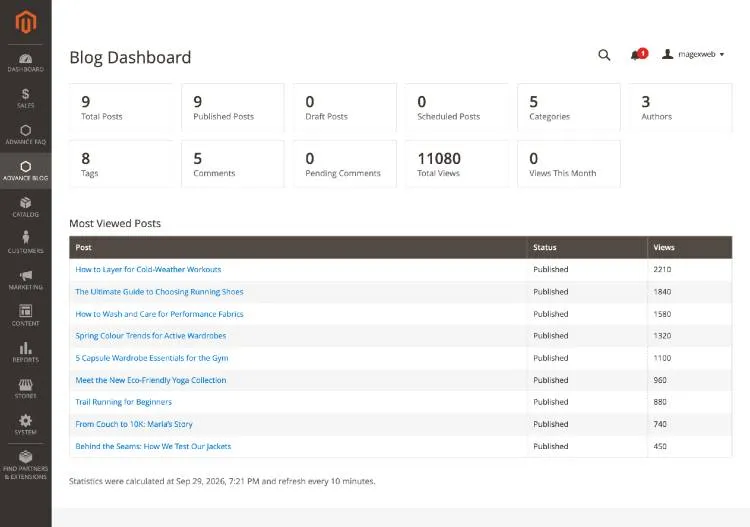
The dashboard shows the number of posts (published, draft and scheduled), categories, authors, tags and comments, the comments waiting for approval, the total views and the most viewed posts.
Posts
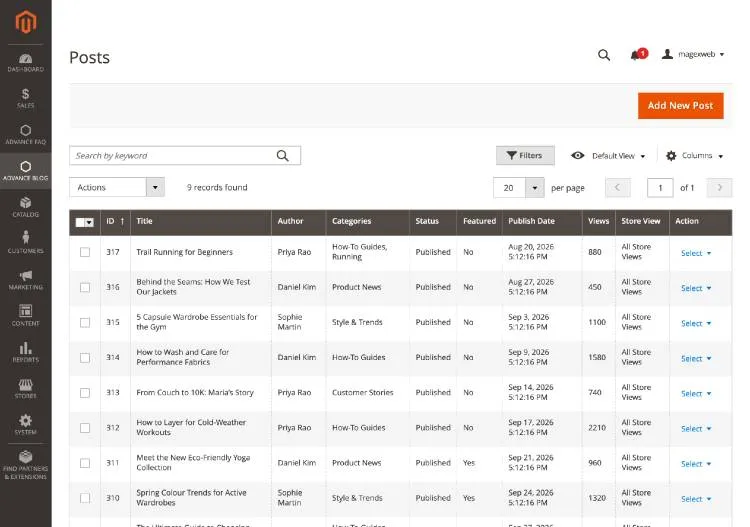
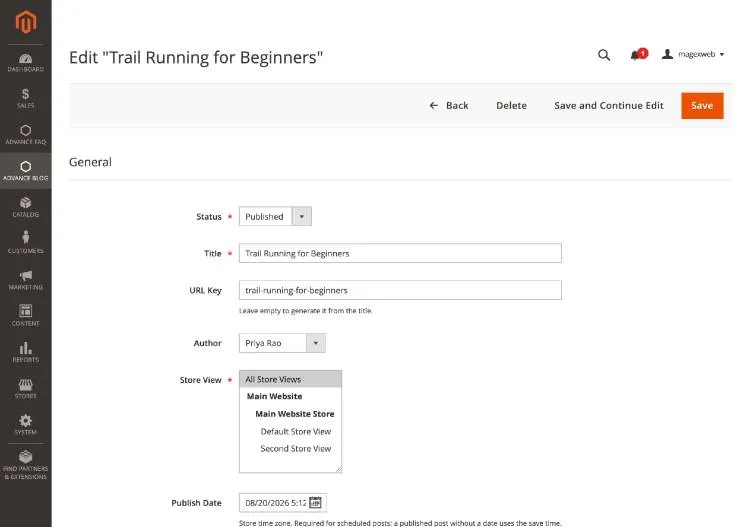
Go to Advance Blog > Posts. The grid supports keyword search, filters (including Store View and Category), column selection, mass actions (Publish, Disable, Feature, Unfeature, Delete) and a Duplicate action for each post. Click Add New Post to write a post.
| Section | Fields |
|---|---|
| General | Status (Draft, Published, Scheduled, Disabled), Title, URL Key, Author, Store View, Publish Date, Featured, Allow Comments, Sort Order |
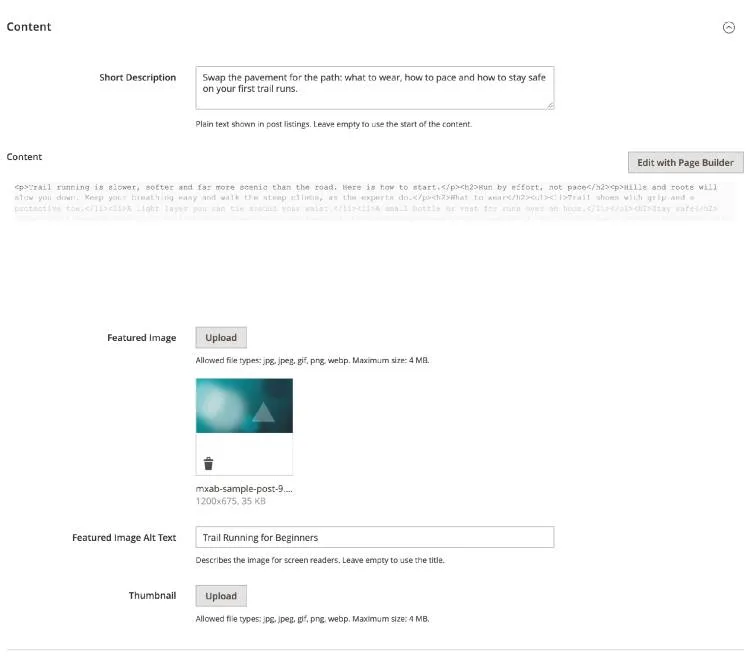
| Content | Short Description (shown in post lists), Content (WYSIWYG editor or Page Builder), Featured Image and its Alt Text, Thumbnail (optional image for post lists) |
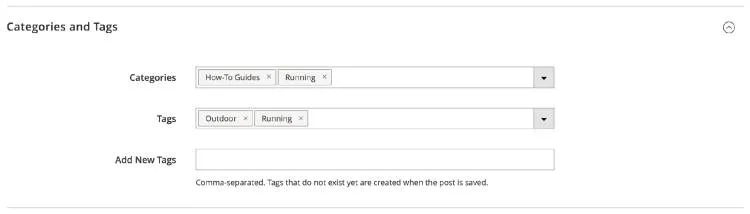
| Categories and Tags | Categories, Tags, and Add New Tags (enter new tag names separated by commas; they are created when you save) |
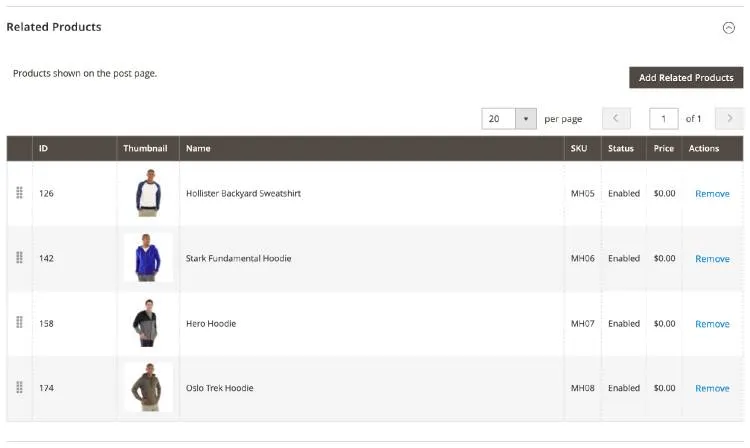
| Related Products | Products shown under the post. Click Add Related Products, select products and drag rows to change their order. |
| Related Posts | Posts shown under the post when the Related Posts Method uses manual selection. |
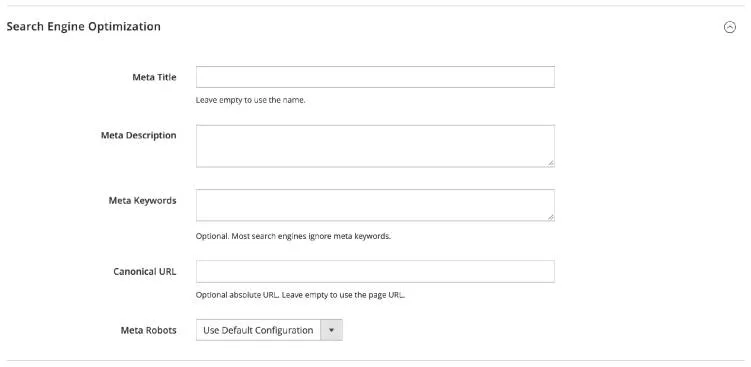
| Search Engine Optimization | Meta Title, Meta Description, Meta Keywords, Canonical URL, Meta Robots |
Note: to schedule a post, set Status to Scheduled and choose a future Publish Date. Magento cron publishes the post at that time.
Categories
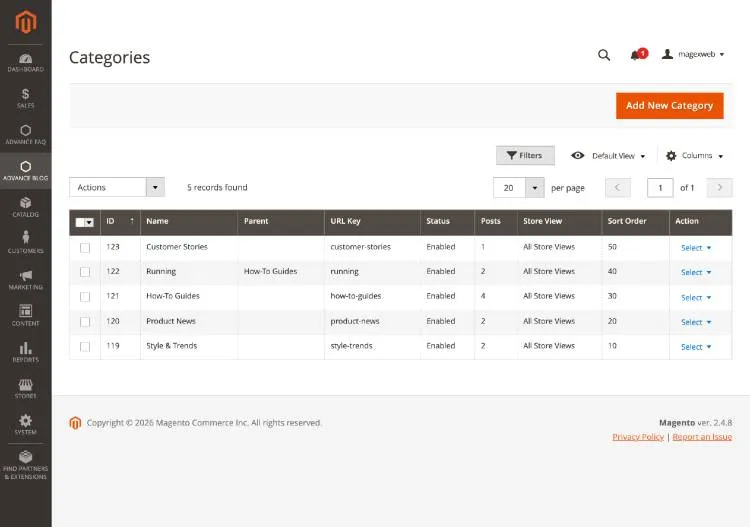
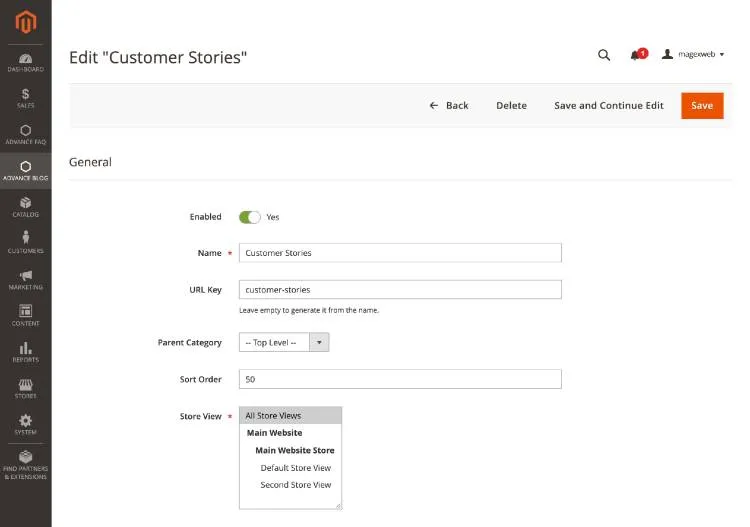
Go to Advance Blog > Categories. Categories can be nested: choose a Parent Category to create a subcategory. Each category has a name, URL key, description, banner image, sort order, store views and SEO fields.
Authors
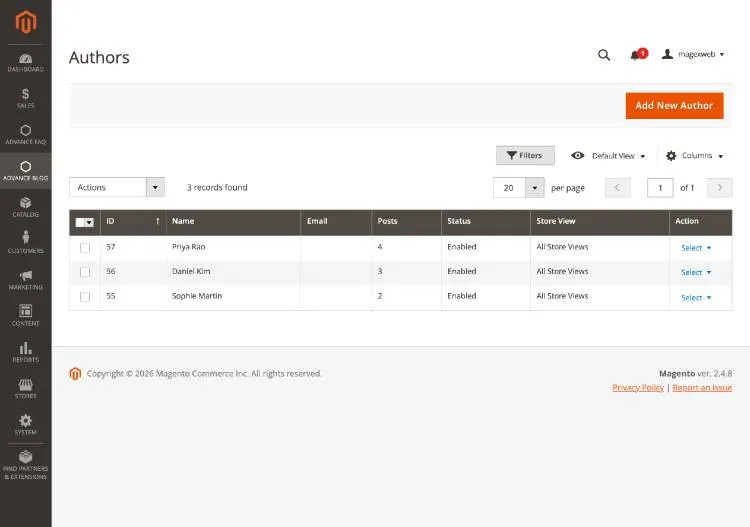
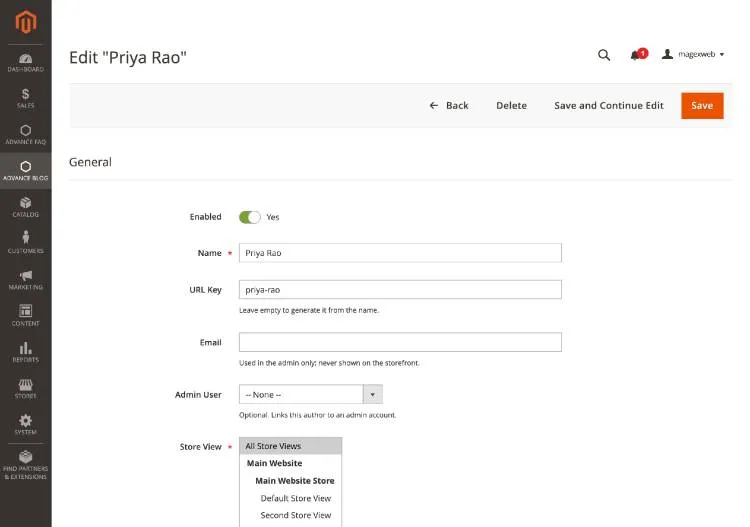
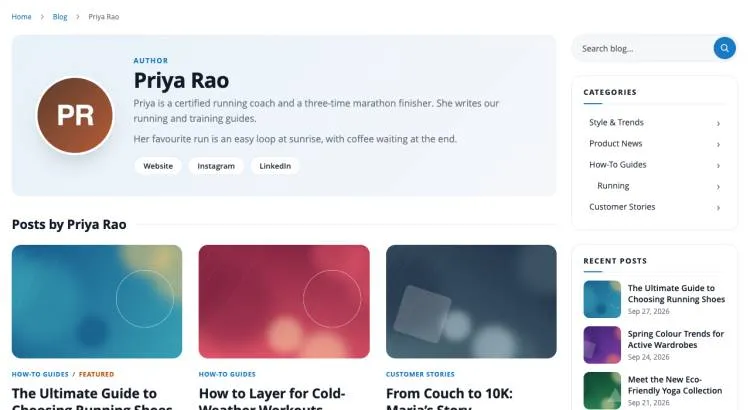
Go to Advance Blog > Authors. Each author has a profile page with photo, short bio (shown in the author box of posts), biography, website and social media links. An author can be linked to an admin user.
Tags
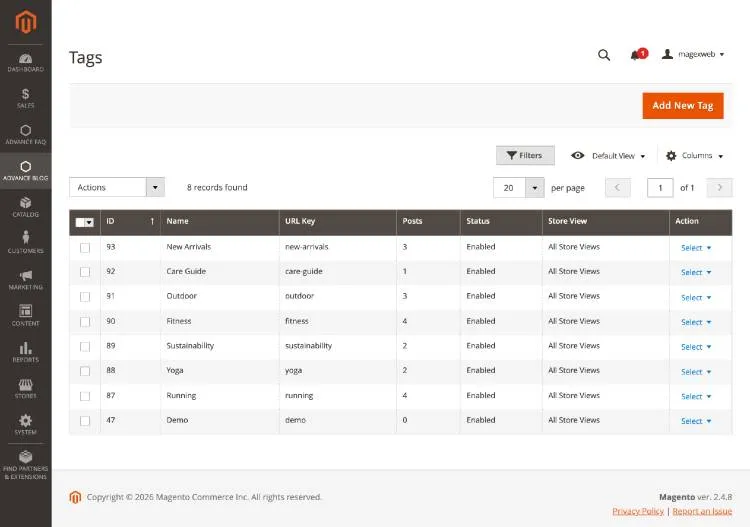
Go to Advance Blog > Tags to add, rename or delete tags. Tags can also be created while editing a post with the Add New Tags field. Every tag has its own page listing its posts.
Comments
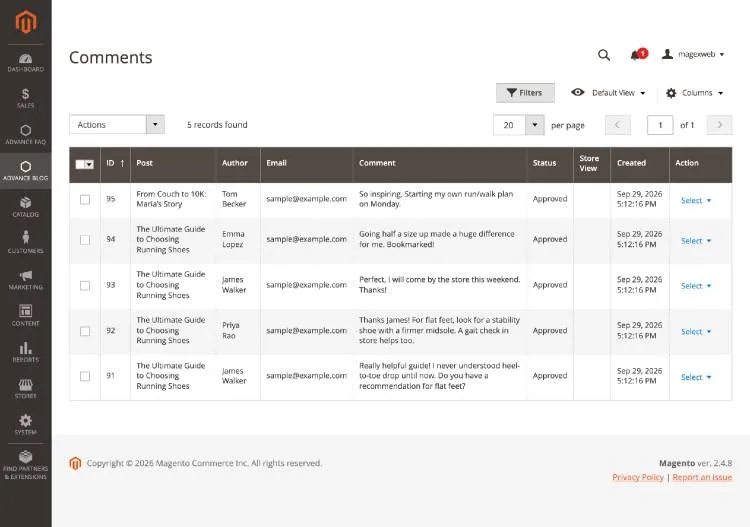
Go to Advance Blog > Comments to moderate comments. Filter by status, then approve, reject, mark as spam or delete comments, one by one or with mass actions.
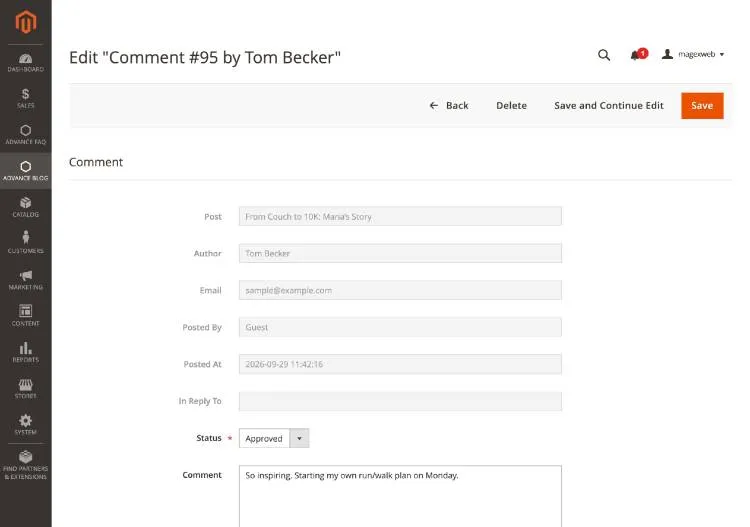
Open a comment to change its status or to reply as the store. Your reply is published under the comment with a Staff badge, and the customer is notified by email if they asked to be.
Storefront behaviour
Once enabled and configured, the blog behaves as follows for shoppers:
- The blog is available at
/blog(or the Blog URL Key you configured), with a link in the top menu. - Posts are shown in the layout chosen in Post Listing, with pagination.
- Only posts that are published, visible in the current store view and whose publish date has passed are shown.
- Category, author and tag pages list their posts; the category page shows the category banner and description.
- The sidebar shows the search box, categories, recent and popular posts, and tags.
- Comments are shown under the post once approved; replies appear under the comment they answer.
- Products linked to a post appear under the post, and the post appears as a related article on those product pages.
Widgets and Page Builder
CMS widgets
Add blog content to any CMS page, block or widget position in Content > Widgets, or with Insert Widget in the editor:
| Widget | Description |
|---|---|
| Advance Blog - Latest Posts | The newest posts, optionally from one category, in a grid or list. |
| Advance Blog - Featured Posts | Posts marked as Featured. |
| Advance Blog - Popular Posts | The most viewed posts. |
| Advance Blog - Related Posts | Posts related to a post you choose. |
| Advance Blog - Related Products | Products linked to a post you choose. |
| Advance Blog - Categories | The blog category tree. |
| Advance Blog - Tags | The tag cloud. |
| Advance Blog - Search | A blog search box. |
Page Builder
In Page Builder, drag the Blog Posts element from the Add Content group onto the page. Choose which posts to show (Latest, Featured or Popular), how many, and the layout. The element shows a live preview while you edit.
SEO and URLs
| Page | URL |
|---|---|
| Blog home | /blog |
| Post | /blog/post-url-key |
| Category | /blog/category/category-url-key |
| Author | /blog/author/author-url-key |
| Tag | /blog/tag/tag-url-key |
| Search | /blog/search?q=keyword |
| RSS feed | /blog/rss |
- The blog URL key and an optional URL suffix (for example
.html) are set in General configuration. - When you change a URL key, the old URL redirects (301) to the new one if Create Permanent Redirect for Old URLs is enabled.
- After changing the blog URL key or suffix, rebuild all blog URLs with
php bin/magento magexweb:advanceblog:urls:regenerate. - Every post, category, author and tag has its own meta title, meta description, meta robots and canonical URL.
- Structured data (JSON-LD) for BlogPosting, Blog, Person and BreadcrumbList, plus Open Graph and Twitter / X card tags, are added automatically.
- Posts, categories, authors and tags are added to the XML sitemap generated in Marketing > Site Map.
Admin permissions
In System > Permissions > User Roles, give each role only the parts of the blog it needs, under Advance Blog:
| Resource | Allows |
|---|---|
| Dashboard | Viewing the blog dashboard |
| Posts (Save Post, Delete Post) | Viewing, saving and deleting posts |
| Categories (Save Category, Delete Category) | Viewing, saving and deleting categories |
| Authors (Save Author, Delete Author) | Viewing, saving and deleting authors |
| Tags (Save Tag, Delete Tag) | Viewing, saving and deleting tags |
| Comments (Moderate and Reply, Delete Comment) | Viewing, moderating, replying to and deleting comments |
| Advance Blog Configuration | The configuration section under Stores > Configuration |
REST API
Storefront endpoints are public and return only published content visible in the store view of the request (/rest/<store_code>/V1/...). Admin endpoints need an admin or integration token with the matching Advance Blog permission.
| Endpoint | Description |
|---|---|
GET /V1/advanceblog/posts, /posts/:postId | Published posts (public) |
GET /V1/advanceblog/categories, /authors, /tags | Visible categories, authors and tags (public) |
/V1/advanceblog/admin/posts | GET, POST, PUT, DELETE posts (admin) |
/V1/advanceblog/admin/categories, /authors, /tags | GET, POST, PUT, DELETE categories, authors and tags (admin) |
/V1/advanceblog/admin/comments | GET, PUT (moderate) and DELETE comments (admin) |
Cron jobs and commands
| Cron job | Schedule | Purpose |
|---|---|---|
magexweb_advanceblog_publish_scheduled_posts | Every 5 minutes | Publishes scheduled posts whose publish date has passed |
magexweb_advanceblog_aggregate_post_views | Every 15 minutes | Updates the view counts used by popular posts and the dashboard |
magexweb_advanceblog_regenerate_url_rewrites | Every 5 minutes | Rebuilds the blog URL rewrites after the URL configuration changed |
| Command | Purpose |
|---|---|
magexweb:advanceblog:sample-data:install / :remove | Install or remove the sample blog content |
magexweb:advanceblog:urls:regenerate | Rebuild all blog URL rewrites |
Uninstallation
- Optional:
php bin/magento magexweb:advanceblog:sample-data:remove php bin/magento module:disable Magexweb_Advanceblog- Remove the module files (
composer remove magexweb/advanceblog, or deleteapp/code/Magexweb/Advanceblog). php bin/magento setup:upgrade && php bin/magento cache:flush
Important: disabling or removing the module keeps your blog content in the database, so you can reinstall it later without losing anything. To delete the content permanently, back up your database and drop the magexweb_advanceblog_* tables after removing the module.
Troubleshooting and FAQ
The blog page shows "404 Not Found". What should I check?
- Check that Enable Blog is set to Yes for the store view, then run
php bin/magento magexweb:advanceblog:urls:regenerateand flush the cache.
Why does my new post not appear on the storefront?
- Check that its Status is Published, its Publish Date is not in the future and it is assigned to the current store view (or All Store Views). If you use Varnish or another external cache, flush it.
Why are scheduled posts not published?
- Scheduled posts are published by Magento cron. Make sure the Magento cron jobs are running.
Why are customer comments not visible?
- By default new comments wait for approval. Approve them in Advance Blog > Comments, or change Require Approval For in the Comments configuration.
Can I use a different URL than /blog?
- Yes. Change Blog URL Key (and optionally URL Suffix) in General configuration, then rebuild the blog URLs with the
urls:regeneratecommand.
Can I show different posts in different store views?
- Yes. Choose the store views of each post, category, author and tag. A URL key only has to be unique within a store view.
Configuration changes do not show
- Flush the cache in System > Cache Management (Full Page Cache in particular).
The design did not change after an update. Why?
- In production mode, run
php bin/magento setup:static-content:deploy -fand flush the cache.
Support
For help, email info@magexweb.com. Please include your Magento version, PHP version and a description of the problem.